
 DeltaSnap
  DriveSync
  Noject
  DeltaSync
 MacVisor can run a Mac as a local virtualization host: VMs start at login, keep running with no window open, and come back after a reboot. Nothing about the VMs changes — the same bundles, networks, snapshots, and CLI work exactly as they do interactively.
Turn a VM into a service
- In VM Settings → General → Startup, enable Start Automatically at Login.
- Optionally enable Headless Mode under Display so the VM runs without a graphics device.
- Confirm the background service is enabled on the library dashboard.
mvz autostart <vm> on
mvz start <vm> --headless
mvz wait <vm> --ssh          # block until the agent answers, cloud-init is done, and SSH is up
A VM that was suspended at logout resumes from its saved state rather than cold-booting. You can open its window at any time later without restarting it.
The chain that has to hold
Auto-start only reaches the guest if every link before it holds. The dashboard's Unattended Auto-Start panel appears as soon as any VM is flagged, reports each link's live state, and flags the ones that would break an unattended recovery.
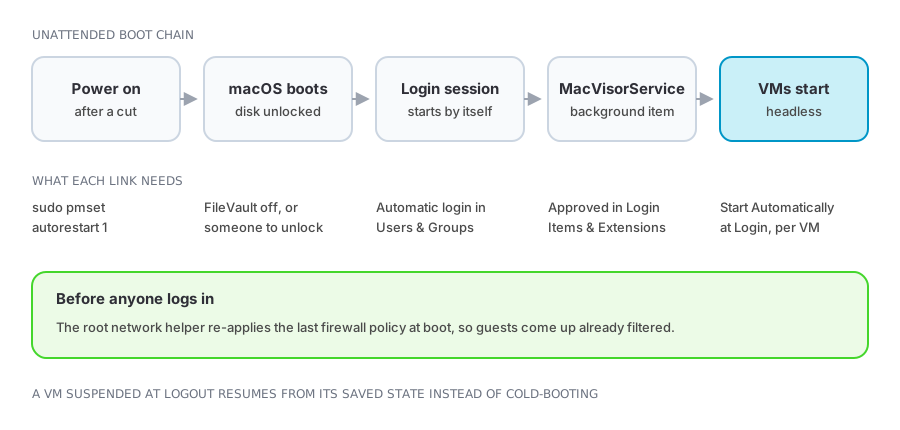
| Link | Where it is set | If it is missing |
|---|---|---|
| Power-failure restart | sudo pmset autorestart 1 | The Mac stays off after a power cut |
| FileVault | System Settings → Privacy & Security | Boot stops at the pre-boot unlock screen until someone types the password |
| Automatic login | System Settings → Users & Groups | No login session starts, so nothing that depends on one runs |
| Background service | Login Items & Extensions, or the dashboard button | MacVisorService never starts, so no VM starts |
| Auto-start flag | VM Settings → Startup | That VM stays stopped |
Firewall policy is the one thing that does not wait for a login session: MacVisor's root network helper re-applies the last applied policy at boot, so guests come up already filtered. See Network firewall.
Managing a host you are not sitting at
mvzdoes everything the app does — creating VMs from cloud images, shells (mvz shell <vm>), lifecycle, snapshots, networks, ports, file delivery, consoles. See Using the CLI.- Menu bar gives every VM's state and lifecycle actions without opening the main window.
- Names and forwards:
<vm>.macvisorreaches a VM by name on the host, cloud-image VMs forward the ports they listen on automatically, and per-VM forwards provide fixed endpoints such asssh -p 2222 localhost. - Custom networks give services stable addresses through DHCP reservations — within vmnet's limits on macOS 27 — and network-level forwards that survive without the guest agent.
- Runner logs are per VM, so one workload's failure is diagnosable on its own.
Capacity
The dashboard's allocation panel compares assigned vCPUs and memory against physical capacity, and provisioned disk against the volume. Two rules of thumb:
- vCPUs are time-sliced, so overcommitting them is fine until every guest is busy at once.
- Memory is not. Assigned guest memory beyond physical RAM means host swapping under load.
- Thin-provisioned disks promise more space than the volume has; watch free space rather than logical size. See Storage and sharing.
Keeping it running
- Each VM runs in its own runner process, so a crash is scoped to that VM.
- The control plane can restart or be upgraded and then reconcile the runners that survived — see Architecture.
- App updates do not interrupt running VMs.
- Snapshots are checkpoints, not backups. A host still needs its own backup, especially one that runs unattended.