
 DeltaSnap
  DriveSync
  Noject
  DeltaSync
 A newly created APFS snapshot mostly shares blocks with the live volume. Its storage impact grows as files on the live volume are changed or deleted.
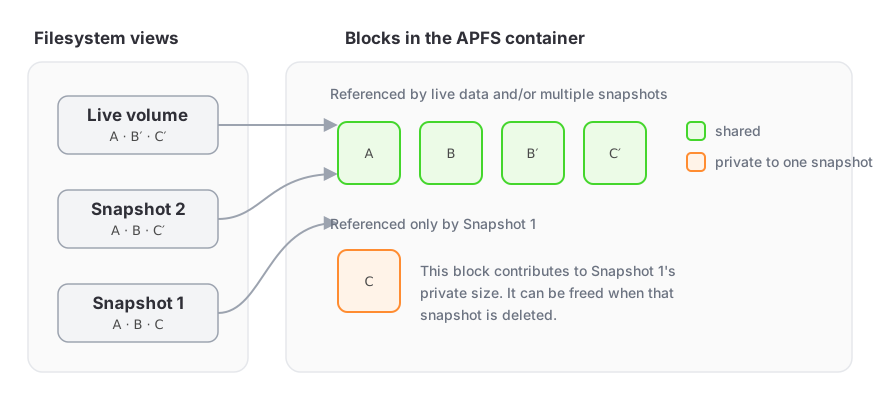
Shared and private blocks
One physical block can be referenced by the live filesystem and several snapshots. APFS frees it only after the last reference disappears.
DeltaSnap's Private Size column is the space referenced only by that snapshot at the time of measurement. It is the best estimate of what deleting just that snapshot returns. Space shared with other snapshots is not counted, so deleting several snapshots can free more than their private sizes add up to.
The volume header shows a separate whole-volume figure: the space all snapshots on the volume hold that the live filesystem no longer references. That is the number Disk Utility reports as the newest snapshot's cumulative size. Neither figure is the apparent size of all files visible when browsing the snapshot.
DeltaSnap 1.0.0 and earlier also showed a cumulative Size column per row, the space freed by deleting that snapshot and every older one. It was removed in 1.0.1: measuring it cost the background service a kernel walk per row that grew with the row's age, and the whole-volume figure answers the same question.
Deleting a snapshot can therefore recover:
- roughly its private blocks;
- less than expected if accounting changes or other references exist;
- more later, after other snapshots are also removed and shared old blocks become unreferenced.
Why size can show a dash
Snapshot names come directly from the APFS snapshot-listing system call. Private sizes come from a separate per-snapshot APFS measurement that walks container metadata. DeltaSnap keeps those measurements in a cache on disk and measures only what it has to: a snapshot it has not measured yet, the newest snapshot (its private size grows as the live volume changes), and the neighbours of a snapshot that was created or deleted, whichever app created or deleted it. The table shows the cached figure at once and updates a row in place when a fresh measurement lands. A — means the value has not been measured yet or the measurement failed; it is never treated as zero.
The Refresh button above the table re-measures every listed snapshot and the volume's snapshot usage. A row APFS cannot measure keeps showing —.
On a very large volume each measurement can take seconds rather than milliseconds. Settings → Indexing → Measure snapshot sizes turns measurement off for the whole Mac: the background service then never walks, the column shows —, and the usage bar keeps its last figure.
Why deleting a large live file may not free space
If an older snapshot still references the file's blocks, APFS must retain them. The live directory entry is gone, but the historical view is intact. Remove only the snapshots you no longer need, then allow macOS time to update its storage accounting.
APFS space sharing
Volumes in the same APFS container usually draw from shared free space. A volume can also have a quota. DeltaSnap shows a fixed capacity total only when macOS reports one for that volume, so the header can differ from Disk Utility's container-wide figures.
Practical retention
Use a deliberate lifecycle even when automatic retention is enabled:
- Create a checkpoint immediately before a risky change.
- Keep it long enough to validate the change.
- Confirm that an independent backup has captured the stable state.
- Let an expiring safety snapshot age out, or delete a local checkpoint when it no longer provides value.
Long-lived snapshots on a busy volume can pin substantial old data. Use Analyze Space for path-level upper-bound estimates, but treat the APFS private size and snapshot usage measurements and macOS free-space reporting as the storage ground truth.