
 DeltaSnap
  DriveSync
  Noject
  DeltaSync
 The bundled vz CLI talks to the same MacVisorService as the app, so both see one library and one set of running VMs. First-run setup links it for you:
/usr/local/bin/vz → /Applications/MacVisor.app/Contents/Helpers/vzThe link is repointed whenever the app moves or updates. If you declined the Network Helper during setup, run the CLI from inside the bundle instead.
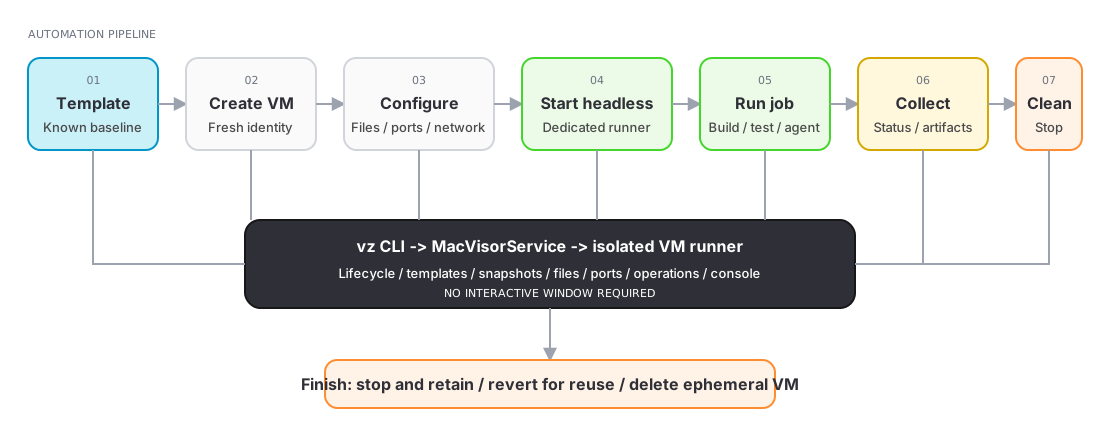
Headless CI workflow
Use a template as a known baseline, create an ephemeral VM, configure files and networking, run the workload headlessly, collect results, and then stop, revert, or delete the environment.
Find VMs and templates
vz list                 # runnable VMs
vz images               # templates (alias: vz templates)
vz show <vm>
vz ip <vm>
A VM selector can be its name, full UUID, or short ID. Add --json to any command that documents it when integrating with scripts.
Lifecycle
vz start <vm>
vz start <vm> --headless
vz stop <vm>
vz poweroff <vm>
vz suspend <vm>
vz resume <vm>
vz restart <vm>
vz open <vm>
vz discard-state <vm>          # throw away a suspended session
vz autostart <vm> on
vz screenshot <vm> frame.jpg   # capture the guest's current display
Prefer stop over poweroff; immediate power-off can cause guest data loss. discard-state is the CLI equivalent of Discard Saved State — the VM cold-boots next time.
Templates
vz images
vz create <template-name-or-id> <new-vm-name>
vz template <vm> on            # promote a stopped VM to a template
vz template <vm> off           # demote it back
The new VM receives a fresh UUID and MAC addresses. Templates live in a Templates folder inside their storage location, and vz scans it alongside the top level, so a template id it lists is an id it accepts.
Snapshots
vz snapshots list <vm>
vz snapshots take <vm> --name "Before update" --notes "Known-good state"
vz snapshots take <vm> --disk-only --name "Clean install"
vz snapshots revert <vm> <snapshot-id> --resume
vz snapshots export <vm> <snapshot-id> <destination-folder>
vz snapshots delete <vm> <snapshot-id>
Files, operations, and ports
vz send <vm> <file-or-folder>...
vz operations list <vm>
vz operations status <operation-id>
vz operations cancel <operation-id>
vz ports list <vm>
vz ports add <vm> --host-port 2222 --guest-port 22 --name SSH
vz ports remove <vm> <forward-id-or-host-port>
File transfer, live IP details, and port tunnels require connected guest tools.
Console and service
vz console <vm>
vz service status
vz service status --json
vz service restart
vz service logs --tail 200
The serial console must be enabled in VM Settings before startup. Use Control-] to detach.
vz service status reports the service PID, the executable it is running from, its LaunchAgent state, and pendingStorageRoots — storage locations macOS has not yet granted the service access to. See Troubleshooting.
Not in the CLI
Creating VMs from installation media, linked clones, disk conversion, custom networks, and firewall policy are GUI operations. vz create covers the scripted path: prepare a template once in the app, then stamp VMs out of it from scripts.