
 DeltaSnap
  DriveSync
  Noject
  DeltaSync
 MacVisor's components are deliberately unprivileged. Everything that manages VMs — the app, the mvz CLI, the control service, and every VM runner — runs as the logged-in user. Exactly one small component runs as root, and its surface is four operations wide.
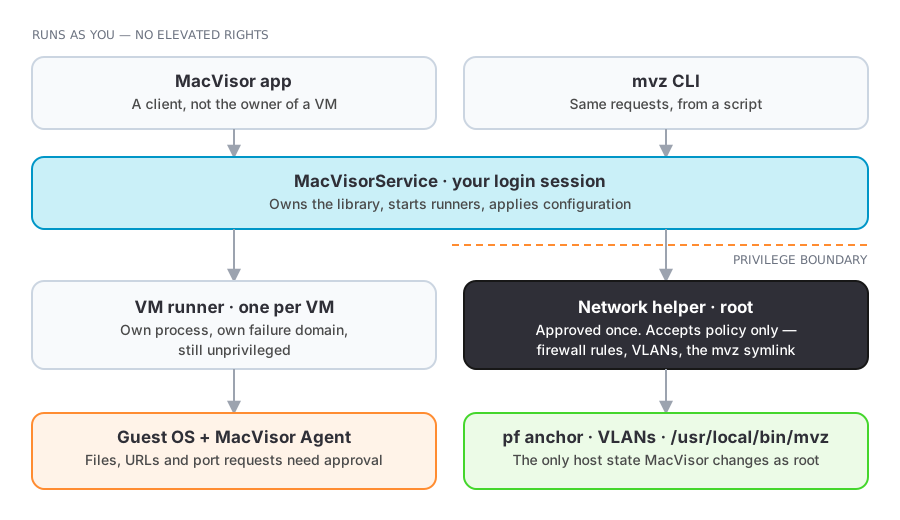
Privileges
| Component | Runs as | Why |
|---|---|---|
MacVisor app, mvz CLI | You | Clients of the control service; they do not own VM processes |
| MacVisorService | You, as a login agent | Owns the library and starts runners; needs nothing beyond your own rights |
| MacVisorVMRunner | You, one per VM | Creates the virtual machine and owns its devices |
| MacVisorNetworkHost | You | Runs named shared and host-only vmnet networks |
| MacVisorAdminHelper | root, approved once | The only host state MacVisor changes as root |
The helper — shown as Network Helper during setup — exists because four things genuinely need root: loading firewall rules into pf, creating 802.1Q VLAN interfaces, linking /usr/local/bin/mvz (and macvisor), and writing /etc/resolver/macvisor so <vm>.macvisor lookups go to the service. It is registered as a launch daemon, so you approve it once with one administrator password prompt instead of authorising every change.
It accepts policy, never packet-filter text, and compiles the rules itself. That keeps the blast radius small: a compromised user-level process can only ask for policies the interface could already express, not arbitrary root control of host networking. Remove Enforcement… clears everything it holds, and uninstalling MacVisor unregisters it.
The guest boundary
A VM is isolated by design. Each feature that usefully crosses that isolation is opt-in and visible:
- Shared folders expose chosen host directories over VirtioFS. Share only what the guest needs, and prefer read-only.
- Clipboard synchronisation can be off by default per VM.
- Guest-initiated requests — files, URLs, and automatic port forwards asked for by software inside the guest — always require approval on the host, regardless of the stored trust policy.
- USB passthrough attaches a real host device to a guest; the guest driver then talks to your hardware directly.
- Rosetta sharing and nested virtualization are per-VM capabilities, off unless enabled.
Inside a macOS guest, the agent installs as an ordinary user login item named MacVisor Agent, visible and switchable in the guest's own Login Items & Extensions. It runs as the logged-in guest user, with no elevated rights in the guest.
Two provisioning paths cross the boundary on purpose, once:
- Linux cloud-image VMs are configured by cloud-init with your user name and UID, the public SSH keys from
~/.sshand your agents (or only those you pass with--ssh-key), and your home folder read-only at the same path. Nothing private leaves the Mac; a read-only share of your home folder is still your home folder, so use--no-homefor guests you don't trust. - macOS 27 guests with automatic setup and Remote Login are signed into once by MacVisor, over SSH with the account's password, to authorise your SSH keys and install the agent. MacVisor's own key for this lives at
~/.macvisor/ssh/id_ed25519. The default account (mac/macvisor) is public knowledge; change it for any VM that others can reach.
Network isolation
Host-only networks keep guests off external networks entirely. Custom networks with a firewall policy add ingress and egress control enforced on the host, where the guest cannot disable it. Bridged mode is the opposite choice: the VM appears on your LAN as its own device, subject only to whatever your network already enforces.
Note that traffic between VMs on the same custom network is switched inside vmnet and is not filtered — use separate networks for workloads that must not reach each other. See Network firewall.
macOS permissions MacVisor asks for
- Background item approval for the control service, and one administrator password for the network helper at first-run setup.
- Files and Folders access when your VMs live on a removable, network, or otherwise protected volume. macOS asks once per component: the background service when it scans the library, and the VM runner when it first starts a VM stored there.
- Local Network access, for the app and for the VM runner. VMs live on a local network of their own, and since macOS 15 nothing may talk to it without consent:
mvz shellandexecover SSH, the<vm>.macvisornames, guest address discovery, and the automatic agent install into a macOS 27 guest all connect from the Mac to a guest's address. See Install and activate. - Microphone access, only when a VM is configured to receive host microphone input.
What leaves your Mac
- VM data never does. VM bundles, disks, snapshots, and guest traffic stay local.
- License activation is one network call to Polar, once, at activation. There is no routine phone-home; verification afterwards is local — see Pricing and licensing.
- Image and installer downloads go to the vendors named in the catalogue — the distributions' own servers and Apple's CDN — over HTTPS, and are verified against the vendor's checksum before use.
mvz images pullof a "latest" entry also fetches the vendor's checksum list. - Updates are downloaded over HTTPS and verified against MacVisor's signing key before installation. Running VMs are not interrupted, because each one is its own process.
- Problem reports are created only when you ask for one, saved to a file you choose, and sent by you — nothing is uploaded automatically.
Protecting VM data at rest
A .macvisor bundle contains the guest's whole disk, and — where you enabled macOS automatic setup — the account password in its configuration file. FileVault is the right protection for that, with the trade-off that it blocks unattended reboots described in Always-on host. Snapshots and templates are convenience, not backup; back the host up independently.