
 DeltaSnap
  DriveSync
  Noject
  DeltaSync
 APFS snapshots and backups solve different failure modes. A sound recovery plan uses both.
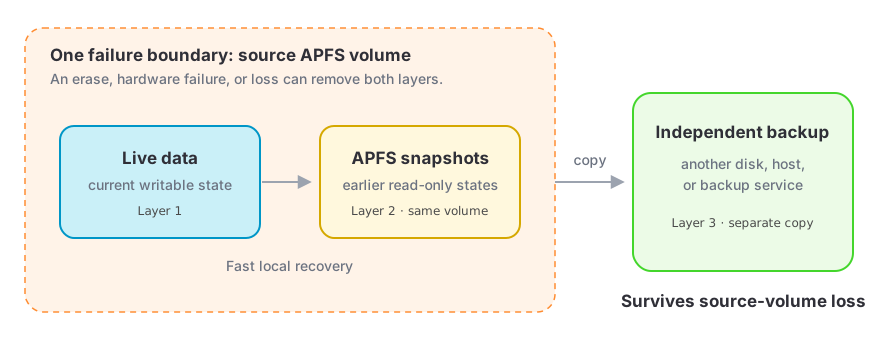
| Layer | Useful for | Does not protect against |
|---|---|---|
| Live files | Current work | deletion, overwrites, device loss |
| DeltaSnap / APFS snapshots | Fast Version Control, diff, and file recovery | disk failure, container erase, theft |
| Independent backup | Recovery after source-volume loss | gaps outside its retention or last successful run |
Before a risky change
- Verify that an independent backup completed successfully.
- Create a safety or protected snapshot on every affected volume.
- Confirm the new snapshot appears before proceeding.
- Install the DeltaSnap AI skill when a compatible agent should checkpoint and verify its own change rounds.
During recovery
- Prefer Restore a Copy and inspect it before replacement.
- Take a safety snapshot before replacing live data.
- Keep the serving snapshot until recovery is verified elsewhere.
- Use the activity and notification history to understand what DeltaSnap did.
Before deletion
- Check the exact kernel name, XID, kind, mount, protection, and TTL.
- Avoid deleting Time Machine, CCC, or other foreign snapshots unless you intend to affect that workflow.
- Close anything using a mounted snapshot.
- Remember that
dsnap destroyhas no undo.
Files that sync to a service
A snapshot captures your disk, not the server an app syncs with. For iCloud Drive, Dropbox, Notes, Mail, and similar apps, that means the snapshot only holds half of it. Quit the app and stop it reaching the server before restoring, or it will quietly undo your restore. See Cloud-synced and app data.
Privacy and local data
Snapshot contents remain on their APFS volumes. DeltaSnap's history index stores path metadata, version signatures, schedules, protection, tags, activity, notifications, and related operational state locally. It does not upload snapshot contents for Version Control or comparison.
DeltaSnap does make limited network requests for license activation/validation and software-update checks. If you turn on email notifications, it also connects to the mail server you configure and sends it notification text, which can include volume names, snapshot names, and file paths; that is off by default and never goes through ScaleNinja. Core Spotlight integration publishes a catalog of recently deleted filenames, up to 20,000 per volume, to the Mac's own Spotlight index so a Spotlight result can open that item's history. Nothing is uploaded and it is not a cloud content search. The catalog is not filtered by location, so deleted filenames from Library and app containers can appear in Spotlight results. See What DeltaSnap cannot do.