
 DeltaSnap
  DriveSync
  Noject
  DeltaSync
 Each VM has a primary network interface and can have additional interfaces. MacVisor gives every NIC a stable MAC address and connects it through one of three modes.
Network modes
| Mode | Use it for |
|---|---|
| NAT | Simple internet access through the Mac |
| Bridged | Put the VM directly on a selected physical network interface |
| Custom vmnet | Attach to a named shared or host-only MacVisor network |
Named shared networks provide a private segment with host-mediated external access. Host-only networks isolate VMs and the host from external networks. Advanced custom-network settings include IPv4/IPv6 behavior, DHCP reservations, DNS proxying, network-level port forwarding, and a firewall policy — see Custom networks and Network firewall.
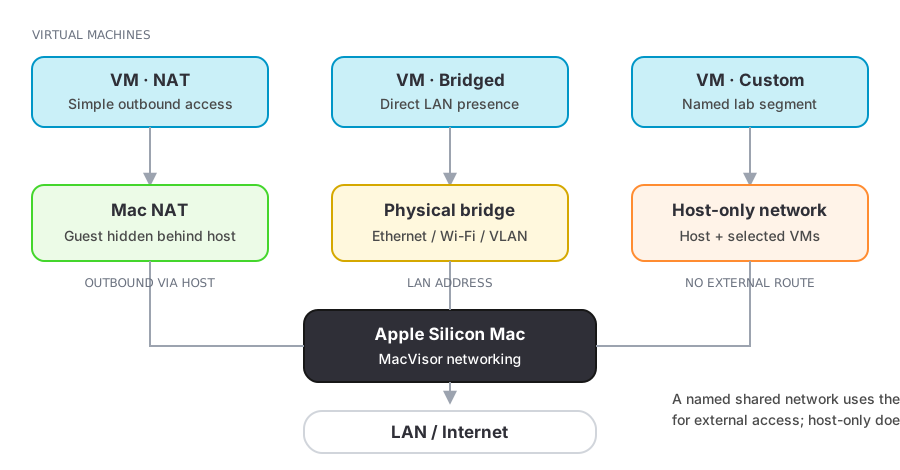
Advanced capability map
| Capability | Scope | What MacVisor controls |
|---|---|---|
| Named shared network | Per segment | Private vmnet segment, optional uplink, NAT44/NAT66, DHCP, DNS proxy, IPv6 RA, and MTU |
| Named host-only network | Per segment | Host-and-VM-only segment with DHCP and IPv6 RA; external NAT and DNS proxy stay off |
| VLAN bridge | Host interface | Creates an 802.1Q interface with a tag from 1–4094, then exposes it to VM NICs and shared-network uplinks |
| Address reservation | Per guest NIC | Keeps a stable IPv4 address by binding a network address to the NIC's MAC |
| Port forwarding | Per network or VM | TCP/UDP vmnet NAT rules for a shared network, or live TCP guest-agent tunnels for one VM |
| Firewall | Per custom network | Host-enforced IPv4 pf policy with inbound/outbound defaults and ordered protocol, CIDR, and port rules |
The host can therefore own addressing and policy without configuration inside every guest. Not every control applies to every mode; the mode/service matrix in Custom networks shows the exact boundary.
Bridging
Choose a physical interface when the guest must appear directly on your LAN. Network policy outside the Mac (DHCP, switch configuration, Wi-Fi restrictions, and firewalls) still applies.
For segmented lab networks, create an 802.1Q VLAN interface from Networks → New VLAN Interface…. It then appears as a bridged host interface that a VM NIC can use directly, or that a shared custom network can take as its uplink.
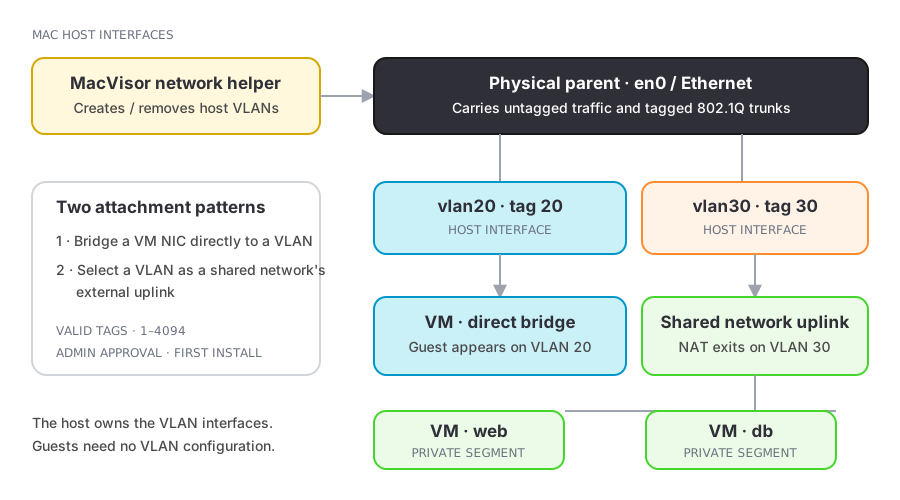
Port forwarding
Forward a host TCP port to a guest port when you want a stable local endpoint such as SSH:
vz ports add <vm> --host-port 2222 --guest-port 22 --name SSH
ssh -p 2222 localhost
The guest agent provides the tunnel used by per-VM port forwarding. Bind to 127.0.0.1 unless other machines genuinely need access.
MacVisor has two kinds of forward, and they suit different situations:
| Per-VM forward | Network forward | |
|---|---|---|
| Path | Guest agent over vsock | vmnet NAT on a custom network |
| Needs guest tools | Yes | No |
| Changes while running | Yes, applies immediately | No — fixed while the network is in use |
| Target | The VM itself | An address inside the segment |
Guest address discovery
With guest tools connected, MacVisor can report live interface names and IPv4/IPv6 addresses:
vz ip <vm>Without the agent, address discovery can be less complete and depends on the selected network path.