
 DeltaSnap
  DriveSync
  Noject
  DeltaSync
 MacVisor is a local virtualization control plane, not a window that happens to own a VM. It separates clients, management, and VM execution so the same installation can be used interactively, as a persistent virtualization host, or through headless automation.
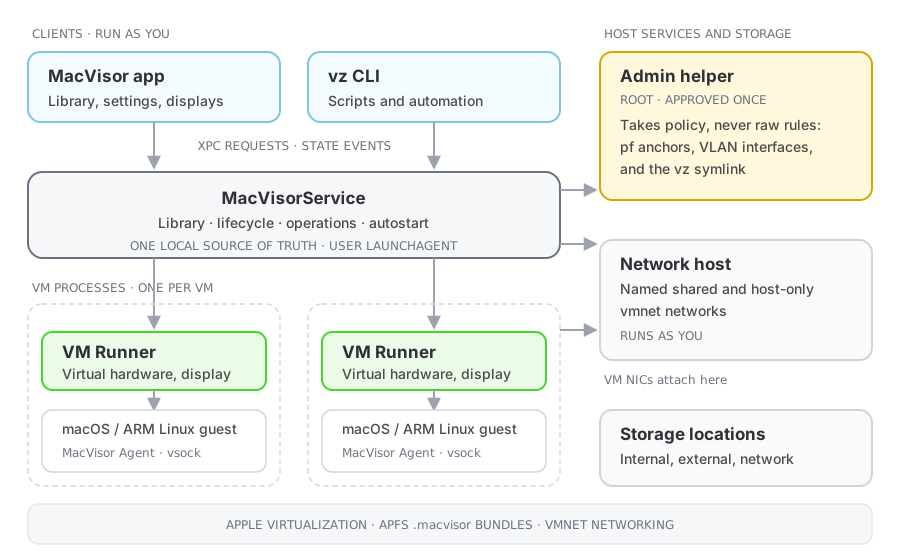
The MacVisor product page provides a visual overview of the same process model and platform capabilities.
One architecture, three operating modes
The operating modes are different ways to control the same VMs. They do not use separate VM formats, runtimes, or management stacks.
Native desktop virtualization
Use the MacVisor app to create, configure, start, and open macOS or ARM Linux VMs in native windows. Display, input, audio, clipboard, shared folders, file transfer, and supported USB devices make this the interactive mode for development, testing, and lab work.
Closing a VM display or the main library window does not have to stop the VM. The app is a client of the control plane; it is not the owner of the VM process.
Local virtualization host
Run MacVisor as a persistent hypervisor for the local Apple Silicon Mac. The background service can start VMs without opening a display, autostart them at login, and keep them running after GUI windows close. Named networks, host-only networks, port forwards, storage locations, and guest tools support always-on services, clusters, and multi-VM labs.
In this mode, the Mac is the virtualization host and MacVisorService is its local control plane. The GUI and vz CLI are interchangeable management clients.
CLI-driven headless automation
Use the bundled vz CLI to create repeatable environments and drive VM lifecycle, templates, snapshots, file delivery, port forwards, guest information, and serial consoles from scripts. VMs can start headlessly and continue without an interactive MacVisor window, which suits local CI jobs, test workflows, build automation, and isolated agent workloads.
See Command line for the available commands and scripting examples.
App and CLI
The MacVisor app and vz CLI are two clients of the same local service. They can list VMs, request lifecycle changes, manage snapshots, and receive current state without controlling the virtual machine directly.
MacVisorService
The background service is the local control plane. It tracks VM bundles and long-running operations, applies configuration changes, starts runners, handles autostart, and publishes state changes back to clients.
Because the service runs independently, you can close, restart, or upgrade the GUI and continue controlling a VM from Terminal. The GUI and CLI can evolve independently of running VM processes because neither client owns them.
One runner per VM
Every running VM has its own MacVisorVMRunner process. The runner creates the Apple virtual machine, owns its display and devices, and reports state to the service. If one runner fails, its VM is affected without taking down other VM runners, the GUI, CLI, or control plane.
This process boundary also keeps a fault in one VM workload from becoming an application-wide failure. Other VMs retain their own runtime owners and lifecycles.
Network host
Custom shared and host-only networks are managed by a separate network-host component. VM runners attach their configured network interfaces to those named networks. Default NAT and physical bridging use the corresponding Apple networking path.
Admin helper
One component runs as root: MacVisorAdminHelper, a small launch daemon shown as Network Helper during setup. It loads firewall rules into pf, creates 802.1Q VLAN interfaces, and links /usr/local/bin/vz. It is approved once with a single administrator password, accepts policy rather than packet-filter text, and re-applies the last firewall policy at boot before any login session exists. Everything else — app, CLI, service, network host, and runners — runs as the logged-in user. See Security model.
Storage access
The service treats each storage location as something that may not be readable yet. macOS requires consent before a background process reads removable, network, or protected folders, and the read blocks until the prompt is answered — so locations are probed independently, with a short grace period, and one waiting location can never stall the rest of the library. A location that is still waiting is reported as such in the sidebar and in vz service status.
Guest agent
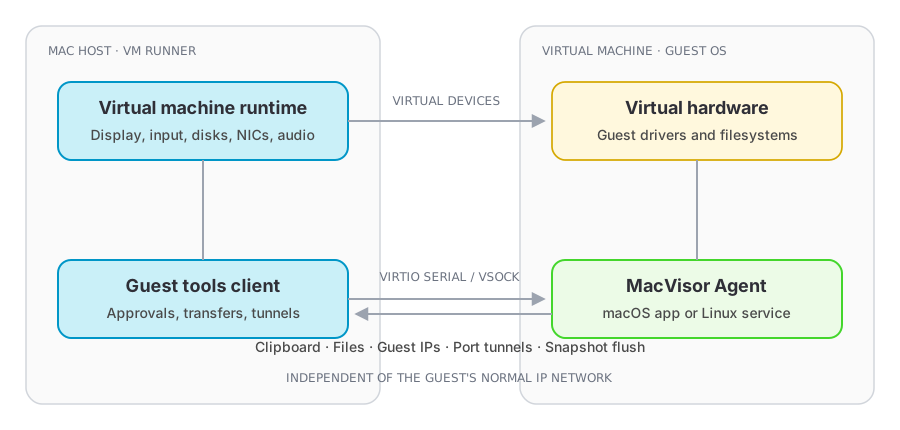
The optional MacVisor Agent runs inside macOS or Linux guests. It communicates with the host through a virtual device rather than depending on the VM's normal IP network. It enables live guest information, clipboard sync, file transfer, port tunnels, and snapshot filesystem preparation.
Independent lifecycles and recovery
Each layer can restart without making every other layer share its lifecycle:
- GUI or CLI restart: clients reconnect to MacVisorService and read the current state. Closing or upgrading a client does not stop a VM.
- VM runner failure: only the VM owned by that runner is interrupted. Other runners and the control plane continue operating.
- Control-plane restart: running VM processes remain separate from the service. When MacVisorService returns, it reconciles live runner records, restores its view of running workloads, and removes stale process records.
- Control-plane upgrade: the service can be replaced and restarted without coupling the upgrade to the GUI, CLI, or every VM runtime. Management is briefly unavailable while clients reconnect and reconciliation completes.
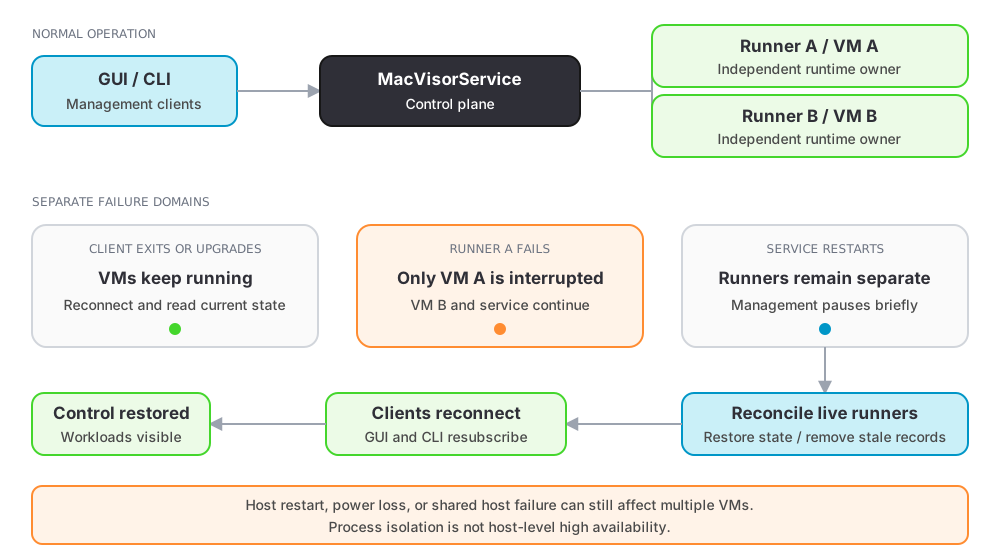
This is crash isolation, not a claim that every operation can survive every host-level failure. A macOS restart, forced power loss, or failure in shared host infrastructure can still affect multiple VMs. Use snapshots and normal host backups for recovery from those events.
Why this design matters
- A display window can close while the VM keeps running.
- GUI and CLI operations use one source of truth.
- VMs can start headlessly at login.
- Each running VM has an independent process boundary and failure domain.
- The control plane can restart and reconcile surviving VM runners.
- GUI, CLI, control-plane, and VM runtime upgrades do not need one shared process lifecycle.
- Guest integration can work even on an isolated guest network.