
 DeltaSnap
  DriveSync
  Noject
  DeltaSync
 A linked clone forks a VM without copying its disk. The source's current disk becomes an immutable base that both VMs read, and each one writes to its own ASIF overlay above it. Creating one is near-instant and consumes no disk space, whether the source disk is 60 GB or 600 GB.
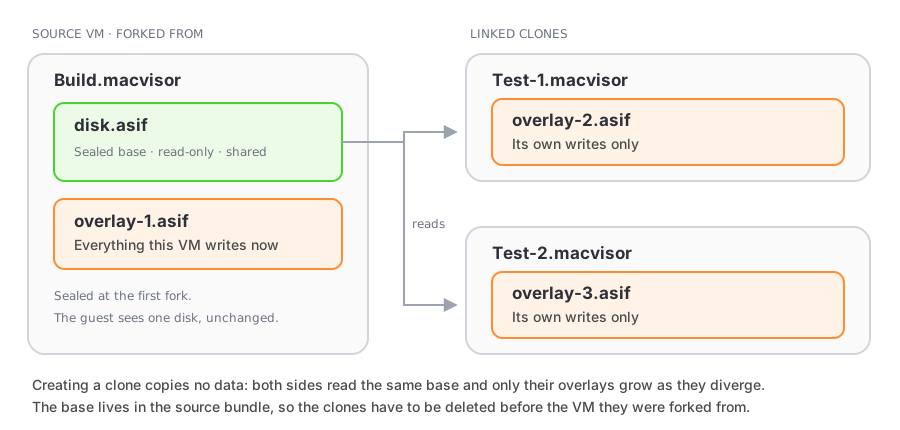
This is the cheap way to get ten copies of a prepared guest for a test matrix, a review environment per branch, or a fleet of CI workers from one golden image.
Create one
Right-click a stopped VM and choose Linked Clone…. The source must:
- use an ASIF boot disk — a raw disk can be converted first, see Storage and sharing;
- be stopped, because sealing rewrites what the VM writes through;
- have no suspended session — resume and shut it down, or discard the saved state first, because saved memory refers to the unsealed disk.
A clone can itself be cloned, to any depth: both sides come out of the fork with the same shape, a base plus their own overlay.
What sealing changes for the source
Forking rewrites the source as well as creating the clone. Its old disk file becomes a read-only base, and the source gets a fresh overlay of its own. Nothing inside the guest notices, but the VM is no longer a single self-contained disk file, and that has consequences.
| Operation | On a VM that has been forked from | On the linked clone |
|---|---|---|
| Start, stop, suspend, snapshot | Yes | Yes |
| Resize the boot disk | No — layered disks can't be resized | No |
| Clone (full copy) | Yes | No |
| Convert to a template | Yes | No |
| Export the bundle | Yes | No |
| Create a VM from one of its snapshots | No — revert instead, then clone | No |
| Delete the VM | Only after its clones are deleted | Yes |
| Revert to a snapshot | Only after its clones are deleted | Yes |
MacVisor refuses each of these by name rather than producing something that breaks later: a template or an exported bundle built from a linked clone would only work while the ancestor it reads through happened to be present.
Deleting in the right order
The base lives in the source's bundle. Deleting or reverting that bundle while a clone still reads through it would leave the clone unbootable, so MacVisor refuses and names the dependants. Delete the clones first, then the source.
Linked clones, full clones, and templates
| Linked clone | Full clone | Template | |
|---|---|---|---|
| Disk cost | None — shares the base | A copy of the disk | A copy per VM created |
| Speed | Instant | As fast as the disk copies | As fast as the disk copies |
| Independent of its source | No | Yes | Yes |
| Can be exported or moved alone | No | Yes | Yes |
| Best for | Many short-lived VMs from one base | A VM you want to keep and move | A catalogue entry you stamp copies from |
Use a template when the copies should outlive or travel away from the original. Use linked clones when you want many of them at once and can delete them in order.
Linked clones are a GUI feature; vz creates full clones and template-based VMs.