
 DeltaSnap
  DriveSync
  Noject
  DeltaSync
 An APFS snapshot is a read-only, point-in-time view of an entire APFS volume. Understanding those three properties (read-only, point-in-time, and volume-wide) is the key to using DeltaSnap safely.
Containers, volumes, folders, and snapshots
An APFS physical store contains one or more containers. A container can hold several volumes that share its available space. Each volume has its own filesystem namespace and snapshot history.
DeltaSnap's sidebar lists usable APFS volumes, not physical disks and not individual folders. When you select a volume and create a snapshot, APFS captures that volume's filesystem state.
Physical disk
└── APFS container (shared free space)
    ├── System volume (sealed, hidden by DeltaSnap)
    ├── Data volume (mounted at /, shown)
    └── Other data volume (shown when usable)
Modern macOS presents the System and Data volumes as one familiar startup disk, but user files live on the writable Data volume. DeltaSnap hides internal roles such as System, Preboot, Recovery, VM, and Update because they are not normal user-data workspaces.
Copy-on-write, in plain language
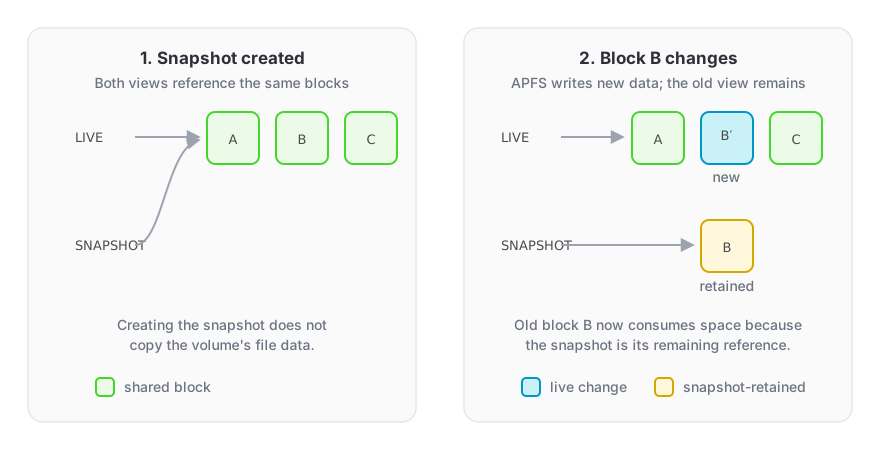
At the moment a snapshot is created, APFS does not duplicate the volume. The live filesystem and snapshot initially reference the same storage blocks.
When you later modify a file, APFS writes changed content to new blocks. The live volume follows the new blocks, while the snapshot retains references to the old ones. This is copy-on-write.
That produces two important effects:
- Snapshot creation is fast and initially cheap.
- Snapshot storage grows as the live volume changes, because old blocks must remain available.
Deleting a live file therefore may not free all of its storage while a snapshot still references its old blocks.
A snapshot is not a second copy
Snapshots protect against some logical mistakes, such as overwriting or deleting files, while the source volume remains healthy. They do not protect against:
- physical disk failure or theft;
- erasing or reformatting the APFS container;
- corruption that makes the source volume unavailable;
- loss of the Mac containing both live data and snapshots.
For durable recovery, keep an independent backup on another device or service.
Snapshots are read-only
Mounting a snapshot does not move the live volume backward and does not create an editable clone. It exposes the historical filesystem through a read-only mount. Recovery means copying selected files from that mount into a writable destination.
DeltaSnap does not currently implement whole-volume rollback. This is deliberate: restoring a running Data volume in place has broad and potentially destructive consequences.
Snapshots are volume-wide
A nickname such as Before database migration describes your intent, not the snapshot boundary. Other changes on the same volume at that moment are captured too. Conversely, data on another APFS volume is not included.
If a workflow spans multiple volumes, each volume needs its own checkpoint, and those snapshots are not transactionally synchronized.
What APFS may reclaim
macOS manages some snapshots, especially Time Machine local and operating-system update snapshots, according to its own storage policies. Treat snapshots as short-lived local recovery points unless another documented system guarantees their retention.