
 DeltaSnap
  DriveSync
  Noject
  DeltaSync
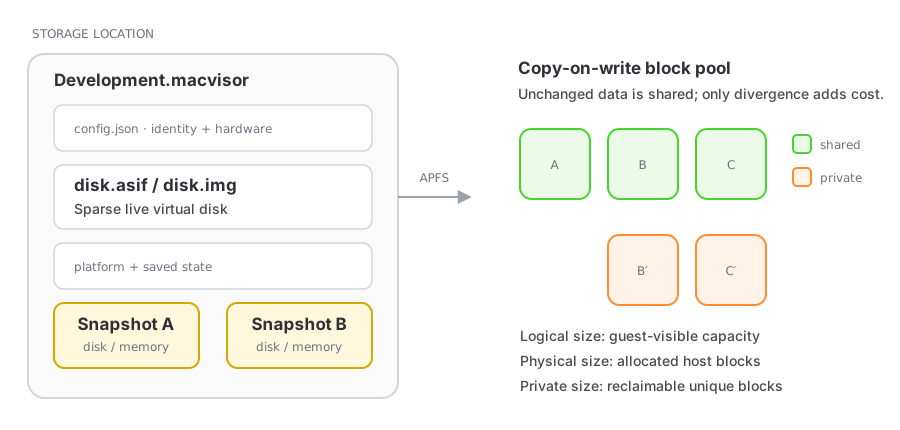
 MacVisor snapshots capture a VM's virtual disks and platform state inside its .macvisor package. On APFS storage, disk files are cloned copy-on-write, so a new snapshot shares unchanged blocks with the live VM.
Disk-only snapshots
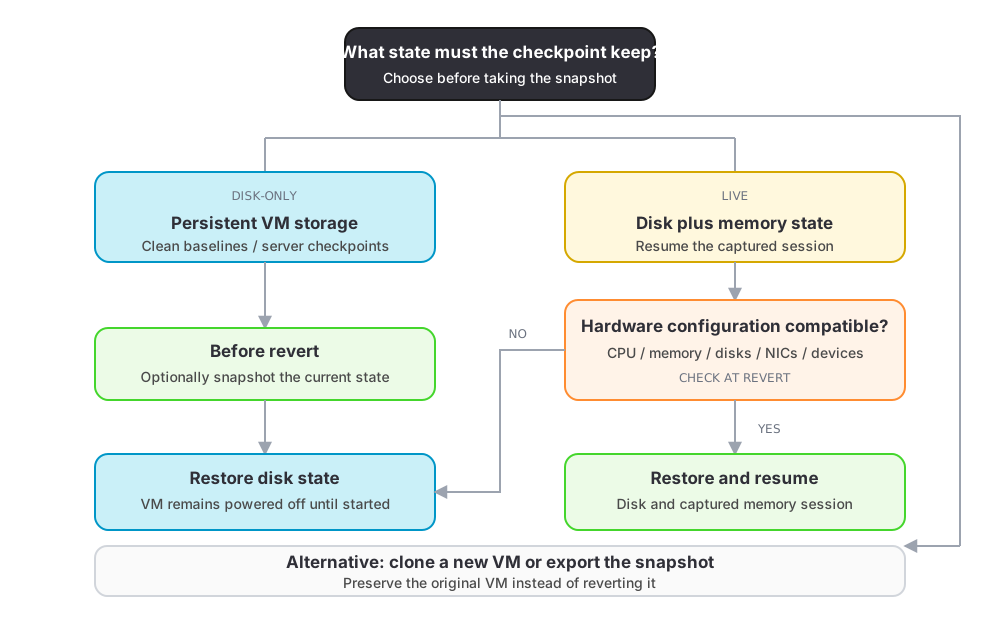
A disk-only snapshot records persistent VM storage. Reverting powers off a running VM and restores the captured disk state.
Use disk-only snapshots for clean installation baselines, server checkpoints, and states that do not need to resume an open desktop session.
Live snapshots
A live snapshot includes disk and saved memory state. It can resume the captured running session when the VM's virtual hardware configuration still matches the captured configuration.
Changing CPU, memory, disks, network devices, displays, audio, or other virtual hardware can make the old memory state incompatible. MacVisor then restores the disk and leaves the VM powered off.
Revert safely
Reverting replaces the current disk and, when compatible, memory state. Changes made after the snapshot are lost. The revert sheet can take a safety snapshot of the current state first.
Additional disks created after the snapshot are swept as part of the revert — the VM comes back with exactly the disks it had when the snapshot was taken. Swept images go to the Trash rather than being deleted outright. A revert interrupted by a crash or power loss is detected and completed on the next library scan, so a VM is never left half-restored.
A VM that other VMs have been linked-cloned from cannot be reverted while those clones exist: they read the disk the revert would replace. MacVisor names them and asks you to delete them first.
Clone and export
You can create a new VM from a snapshot without changing the original, or export the snapshot bundle to another folder. Clones receive a new VM identity to avoid collisions.
Neither is available for a VM with a layered boot disk — a linked clone, or a VM that has been forked into one. A snapshot of a layered disk holds only that VM's overlay, so a bundle built from it alone would be missing everything underneath. Revert to the snapshot and clone the VM instead.
Snapshot storage
Logical size describes the guest-visible data. Physical allocation describes blocks on disk. Private size is the amount that deletion can actually reclaim after accounting for APFS sharing.
As the live VM and snapshots diverge, their private usage grows. Delete checkpoints you no longer need after confirming that important VMs are backed up.