
 DeltaSnap
  DriveSync
  Noject
  DeltaSync
 MacVisor is a native virtual-machine manager for Apple Silicon Macs. It runs macOS and ARM Linux guests with Apple's Virtualization framework and brings their lifecycle, snapshots, storage, networking, guest integration, and automation into one app.
What you can do
- Install macOS from an IPSW restore image.
- Install ARM Linux from an ISO.
- Start VMs with a display or run them headlessly.
- Pause, suspend, resume, restart, and safely shut down VMs.
- Take disk-only or live disk-and-memory snapshots.
- Keep every disk in ASIF, Apple's sparse format, and convert legacy raw disks in place.
- Revert, export, or clone a new VM from a snapshot.
- Build reusable templates, or fork a VM instantly with a linked clone that shares its disk.
- Create named shared-NAT and host-only networks, physical bridges, and host 802.1Q VLAN interfaces.
- Configure per-network DHCP, DNS proxy, NAT44, NAT66, IPv6 router advertisements, address reservations, and TCP/UDP forwards.
- Give a custom network an inbound/outbound IPv4 firewall policy enforced by the host's packet filter.
- Share folders, clipboard content, files, and forwarded ports with guest tools.
- Start VMs automatically at login and run the Mac as an always-on virtualization host.
- Watch host resources, allocation, tasks, and service health from the library dashboard.
- Control the library through the bundled
vzcommand-line tool.
Native virtualization
MacVisor virtualizes the guest's ARM64 code directly on Apple Silicon. It is not a cross-architecture emulator and does not include Windows support. Use ARM64 Linux installation media; x86 operating-system images will not boot.
macOS guests can use Apple's accelerated graphics device. Linux guests use Virtio graphics. Hardware and operating-system availability also controls optional features such as nested virtualization, USB passthrough, and automatic macOS setup.
VMs remain independent of the app window
MacVisor separates management from VM execution. Closing the main app or hiding a display does not have to stop a running VM. A background service owns the library and starts a separate runner process for each active VM.
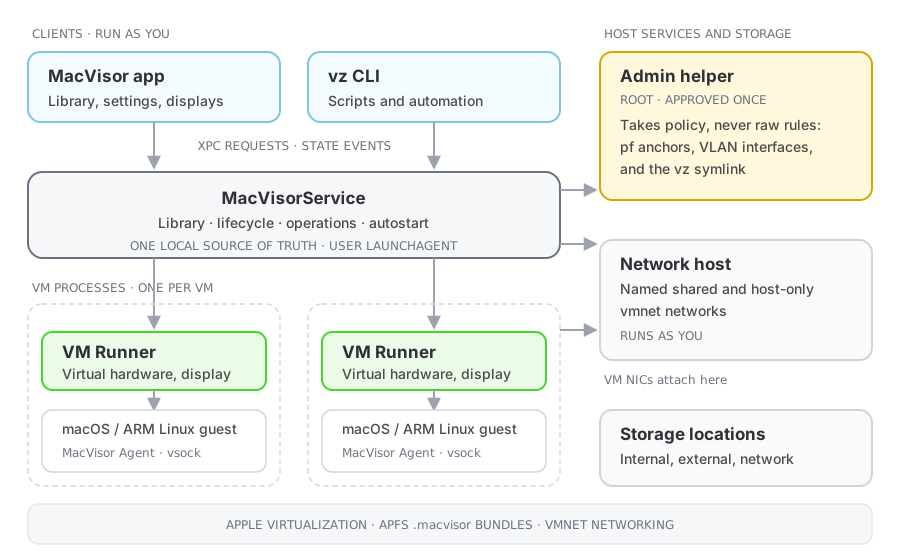
That architecture supports three operating modes without changing VM formats or management stacks:
- Native desktop virtualization through the MacVisor app and VM windows.
- A persistent local virtualization host with headless VMs, autostart, networks, and port forwards.
- CLI-driven headless infrastructure for automation, CI workflows, testing, and isolated agent workloads.
Each VM runs in its own runner process. A runner failure is isolated to that VM, while the GUI, CLI, control plane, and other VM runners keep separate lifecycles. The control plane can restart or be upgraded and then reconcile surviving runners when it returns.
Read Architecture and operating modes for the component boundaries, operating models, and recovery behavior, and the Security model for which component runs with which privileges. The MacVisor product page also presents the architecture visually.
What a VM contains
Each VM is a .macvisor package containing its configuration, virtual disks, platform data, saved state, and snapshots. You can keep libraries in multiple storage locations and move VMs between them.
MacVisor 27 runs on Apple Silicon Macs with macOS 27. The MacVisor Agent installed inside a macOS guest supports macOS 14 and later.