
 DeltaSnap
  DriveSync
  Noject
  DeltaSync
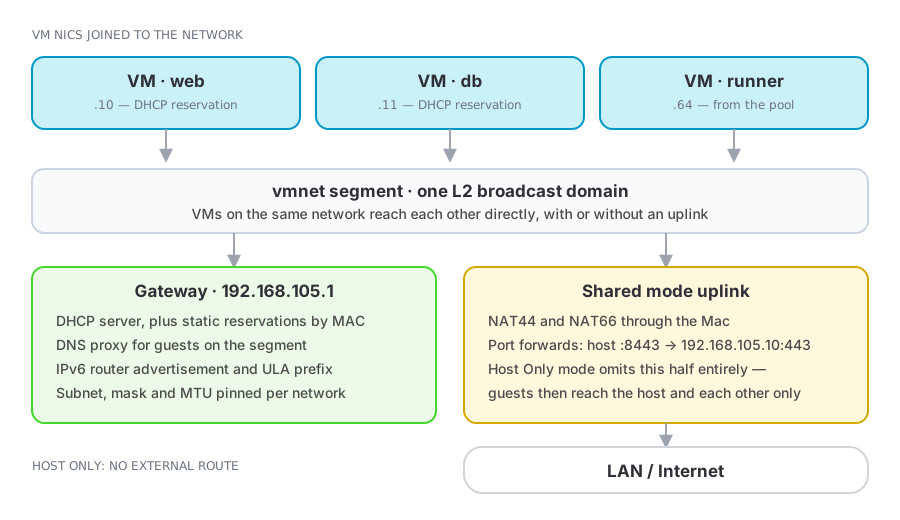
 A custom network is a named private segment that any number of VMs can join. VMs on the same network see each other directly; what changes between modes is whether anything routes outside.
| Mode | Behaviour |
|---|---|
| Shared (NAT) | Private segment plus an uplink that NATs to the outside world through the Mac |
| Host Only | The host and the VMs on the segment, and nothing beyond |
Create and manage them in the Networks section of the sidebar, or with mvz networks. VMs made from cloud images join one such network by default, the Default MacVisor Network.
Defining a network
A network exists as a definition as soon as you create it, and becomes live when the first VM using it starts. The detail view shows which of the two it currently is, so an empty definition is never mistaken for a running segment.
Attach a VM by choosing the network in VM Settings → Network, or with mvz set <vm> --network <network>. Network topology is a restart-level change for a running VM.
mvz networks                                   # list
mvz networks create lab                        # shared, automatic subnet
mvz networks create isolated --host-only       # host-only, automatic subnet
mvz set dev --network lab
mvz networks rm lab                            # refused while a VM uses it
Addressing
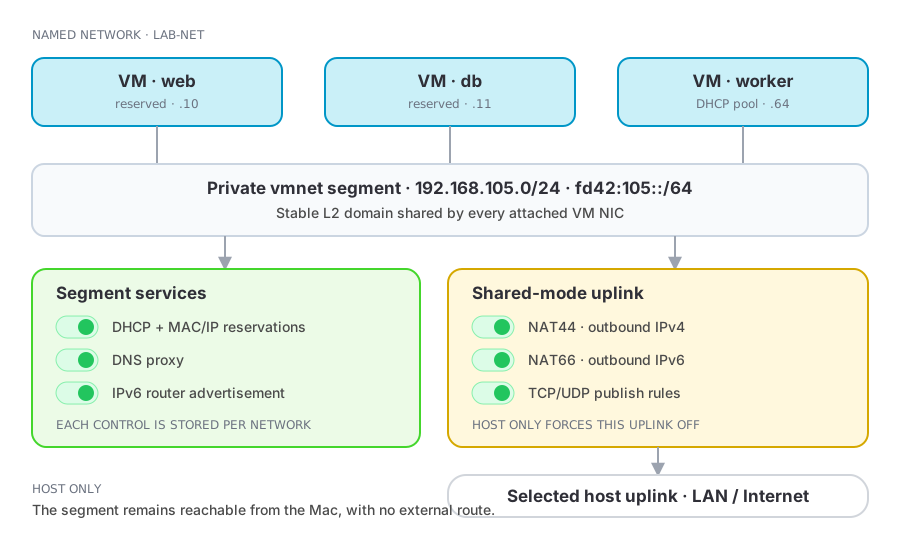
Leave addressing empty and vmnet picks a /24 under 192.168.0.0/16. What you can pin depends on the mode, and on macOS 27 the limits are vmnet's, not MacVisor's:
| Network | Subnet | DHCP from macOS | Reservations |
|---|---|---|---|
| Shared (NAT) | Chosen by vmnet each time the network is created; a fixed subnet is refused | Yes | Honoured, but only while the subnet stays the same |
| Host Only, automatic subnet | Chosen by vmnet | Yes | Honoured |
| Host Only, fixed subnet | Yours — a /24 under 192.168.0.0/16 | None — macOS serves no leases on a fixed subnet | Ignored — configure addresses inside the guests yourself |
- IPv4 subnet and mask — host-only networks only. vmnet accepts only
/24subnets under192.168.0.0/16; anything else is rejected, and MacVisor warns before you save. Guests on a fixed subnet get no address from DHCP, so configure them statically inside the guest. - IPv6 prefix and length — a specific ULA prefix instead of a random one.
- MTU — defaults to 1500.
Because applying a change to a shared network recreates it, and vmnet picks the subnet afresh each time, a shared network's addresses are stable between restarts of its VMs but not across edits to the network. The firewall is keyed to the subnet and re-applies itself when the network changes; reservations and anything you wrote down by hand do not follow.
Services
Each network runs its own gateway services, all individually switchable:
| Service | Purpose |
|---|---|
| DHCP server | Addresses guests from the segment's pool |
| DNS proxy | Guests resolve through the host (shared mode) |
| IPv4 NAT (NAT44) | Outbound IPv4 through the uplink (shared mode) |
| IPv6 NAT (NAT66) | Outbound IPv6 through the uplink (shared mode) |
| Router advertisement | IPv6 autoconfiguration on the segment |
Services by mode
| Control | Shared (NAT) | Host Only |
|---|---|---|
| DHCP server | Configurable | Configurable (automatic subnet only) |
| DNS proxy | Configurable | Off |
| IPv4 NAT (NAT44) | Configurable | Off |
| IPv6 NAT (NAT66) | Configurable | Off |
| IPv6 router advertisement | Configurable | Configurable |
Switching a definition to Host Only turns DNS proxy, NAT44, and NAT66 off because that mode has no external uplink. DHCP reservations use the network's DHCP service. Firewall policy belongs to the custom network in either mode, subject to the documented enforcement limits.
In shared mode you can pin the uplink to a specific host interface instead of following the default route — useful when the Mac is on Wi-Fi and Ethernet at once, or when the uplink should be a VLAN interface.
DHCP reservations
A reservation binds a MAC address to an address in the subnet, so the guest keeps the same IP across reboots and reinstalls without any guest-side configuration. The MAC picker lists the NICs of VMs already attached to the network, so you rarely have to type one.
mvz ip dev --wait                          # see which subnet vmnet gave the network
mvz networks reserve lab dev 192.168.105.50
Two conditions, both vmnet's:
- vmnet matches a reservation by the MAC in the DHCP request. VMs made from cloud images identify themselves that way. Guests you installed yourself depend on their own DHCP client — Ubuntu's systemd-networkd, for one, sends a DUID by default and never matches until you set
dhcp-identifier: mac. - Reservations only exist where macOS serves DHCP: shared networks, and host-only networks on an automatic subnet. On a shared network they hold while the subnet stays — see Addressing.
Reservations are the practical companion to port forwarding and firewall rules: both refer to addresses, and DHCP without reservations does not promise the same one twice.
Network port forwarding
Network-level forwards are handled by vmnet NAT itself: a host TCP or UDP port maps to an address and port inside the segment.
host :8443 → 192.168.105.10:443Seeing what is attached
The network detail view lists every VM NIC configured for the network and colour-codes what the host can actually observe:
- Green — the NIC has been seen on the network's bridge via ARP.
- Orange — the VM is running, but no traffic from that NIC has been seen yet, or its attachment failed. Check the VM's runner log.
- Stopped — the VM is configured for the network but is not running.
The Networks section also browses host interfaces themselves: physical uplinks, vmnet bridges, and VLAN interfaces, each with its addresses, child interfaces, and the VM ports currently attached to it.
VLAN interfaces
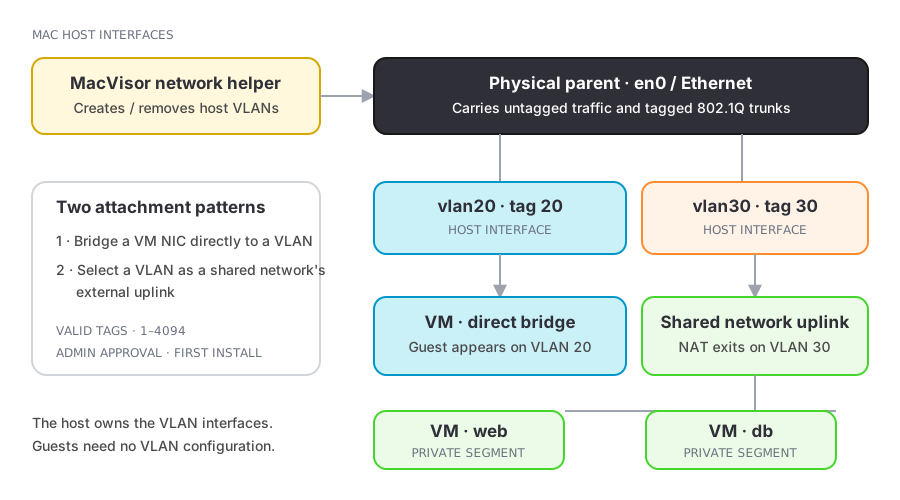
Apple's virtualization framework has no VLAN tagging of its own. MacVisor creates 802.1Q VLAN interfaces on the host instead — New VLAN Interface… takes a name, a tag from 1 to 4094, and a parent physical interface. macOS asks for an administrator password the first time, because interface creation goes through MacVisor's privileged helper.
Once created, the VLAN interface appears as a bridged host interface, so a VM NIC can bridge to it directly or a shared network can use it as its uplink.
Firewalling a network
Each custom network can carry an ingress/egress policy enforced by the host packet filter, set in the app or with mvz networks firewall. See Network firewall.
Deleting a network
Delete removes the definition; mvz networks rm refuses while a VM is using it. VMs still pointing at a deleted network are moved to the Default MacVisor Network the next time they are created or imported, so re-point their NICs first. Changes to a network apply to VMs on their next restart.