
 DeltaSnap
 DriveSync
 Noject
 DeltaSync
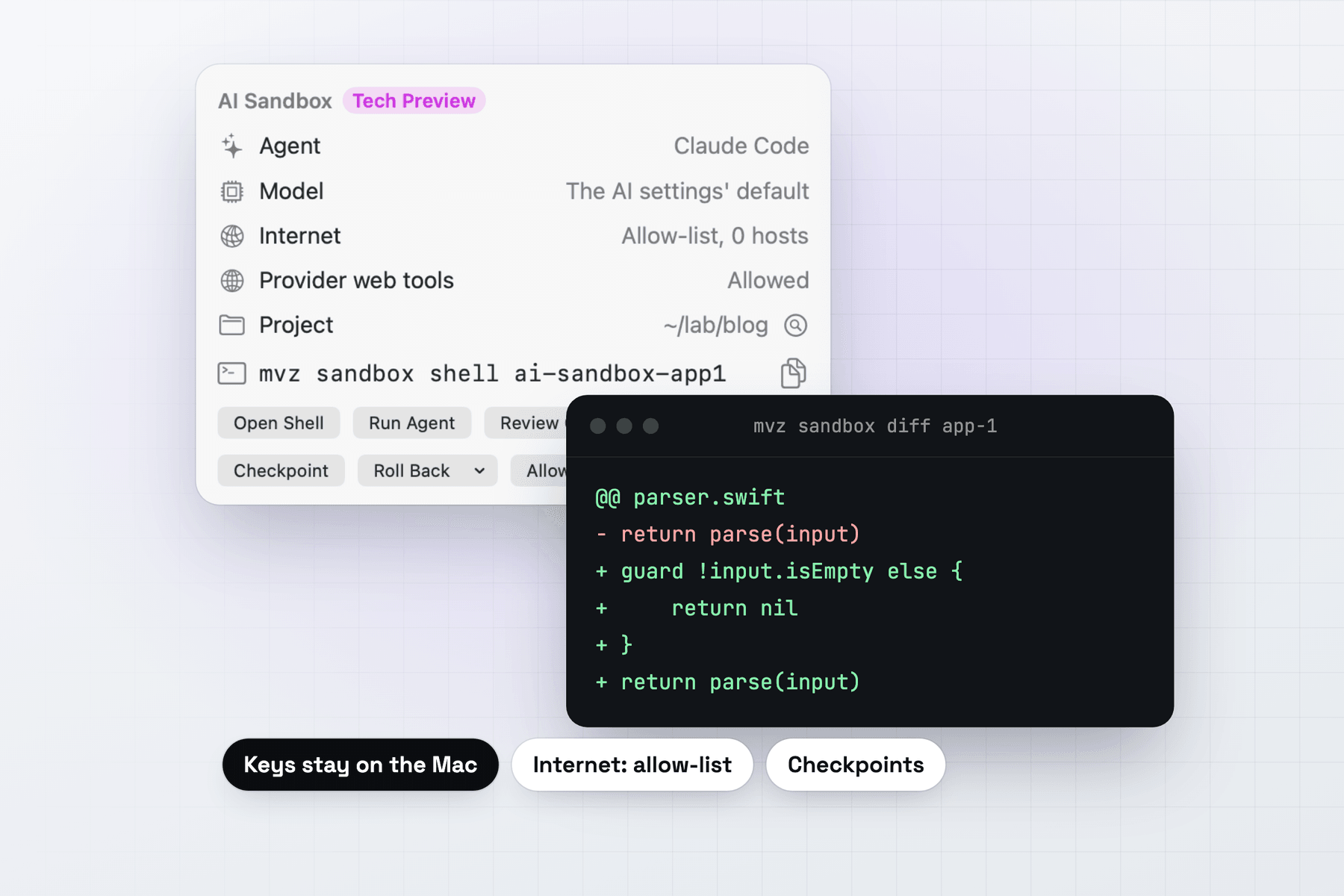
Coding agents do their best work when they can run commands without stopping to ask. On your Mac that means the agent can read your home folder and your keys, reach your network, and change your code directly. Anthropic's own Claude Code documentation recommends running it with --dangerously-skip-permissions only inside a container or a VM.
A MacVisor AI sandbox is that VM, set up for you. The agent gets a disposable Linux or macOS 27 machine with a copy of your project, runs with its permission prompts off, and hands back a diff.
How a sandbox keeps the agent away from your Mac
- Your Mac keeps your project, your API keys (in the Keychain) and any local models.
- MacVisor's gateway sits between the two. It sends the agent's model requests to a local model or a cloud provider and adds your key as each request leaves the Mac, so the VM never holds a key. It also proxies the agent's other connections and lets through only the sites you allow.
- The sandbox VM holds a copy of the project (the working tree, without git history or ignored files) and the agent. It has no shared folders, and with the default internet access no route to your Mac or your local network.
Changes come back only as file contents, compared on the Mac by your own git. Nothing the agent set up in its own git, such as a hook, can run on your Mac.
Create a sandbox and run an agent
In the app, click New AI Sandbox… (the sparkles button beside + in the sidebar). Choose the project folder, the agent, the model and the internet access. When setup finishes, the sandbox's Overview has Run Agent, Review Changes…, Checkpoint and Roll Back.
From Terminal:
mvz sandbox create ~/src/app --agent claude --model claude-sonnet-4-5
mvz sandbox run app-1 -- "fix the failing test in parser.swift"
mvz sandbox attach app-1        # the agent, interactively
mvz sandbox diff app-1
mvz sandbox apply app-1         # or --branch for a new branch
mvz sandbox discard app-1
Point it at the top folder of a git repository. A Linux sandbox is ready in about a minute. It comes from Ubuntu 26.04 with 2 CPUs and 4 GiB of memory unless you ask for more (--cpus, --memory, --disk). Each sandbox gets a checkpoint called pristine right after setup.
Choose an agent and a model
MacVisor installs each agent with its official installer and points it at the gateway. The model name decides where a request goes: claude-* to Anthropic, gpt-*, o3, o4 and codex-* to OpenAI, and any other name to the model server on your Mac. A local/, anthropic/, openai/ or openrouter/ prefix picks the provider outright.
--agent | Agent | Models |
|---|---|---|
goose (default) | Goose | Any local server, or the cloud |
claude | Claude Code | Anthropic, or a local server that speaks Anthropic's API |
codex | OpenAI Codex CLI | OpenAI, or a local server that speaks OpenAI's Responses API |
aider | Aider | Any local server, or the cloud |
opencode | OpenCode | Any local server, or the cloud |
none | Nothing installed | Bring your own agent |
Local models run on the Mac, where they get its full memory and GPU. MacVisor finds Ollama, LM Studio, llama.cpp, oMLX, mlx_lm.server, vLLM and Docker Model Runner on their usual ports. If you have none, mvz models lists open-source coding models that fit your Mac, and mvz models server install ollama installs a server with Homebrew. A sandbox set up with a local model can't switch to a paid cloud model unless you allow it (--cloud).
Cloud models need a key once: mvz ai keys set anthropic (or openai, openrouter), or Settings → AI. Requests are billed to your account with the provider, and mvz ai log app-1 lists each one with its tokens, never its content. See Models.
Internet access
--egress | What the agent can reach |
|---|---|
allowlist (default) | The models, and the sites you add, through MacVisor's proxy |
none | The models only |
open | The internet, your local network and your Mac, like any other VM |
The sites the installer needs are allowed only while create installs the agent. After that, add what the task needs, by host or by preset:
mvz sandbox allow app-1 pypi                 # presets: github, npm, pypi, ubuntu, homebrew...
mvz sandbox allow app-1 registry.npmjs.org
mvz sandbox log app-1 --egress               # what was allowed and blocked
Providers can also fetch pages for the agent on their own servers. With allowlist and none, the gateway refuses those tools (such as Anthropic's web fetch and OpenAI's live web search) with an error that says how to allow them, so a cloud model can't reach a site around the allow list. Plain web search stays allowed. Sites where anyone can upload content, github.com among them, can carry data out, so allow them only when the agent needs them. See Internet access.
Review, apply and roll back
mvz sandbox diff app-1 lists the changed files with totals, and --patch shows the full patch. In the app, Review Changes… shows the same, with Apply… and Apply as Branch…. Files that could run code later on your Mac are flagged: scripts, git hooks, CI and build files, and agent settings such as .claude/, .mcp.json or AGENTS.md.
mvz sandbox apply app-1 brings in exactly what the diff showed, all or nothing. If you kept working meanwhile, MacVisor merges the two and refuses on a conflict. Nothing is staged or committed for you.
A checkpoint saves the whole VM, running processes included, and rolling back takes seconds:
mvz sandbox checkpoint app-1 before-refactor
mvz sandbox rollback app-1 pristine
macOS sandboxes for Xcode work
Add --os macos when the agent needs macOS itself, such as a build or test that runs on macOS or an Xcode project. The first macOS sandbox takes longer because macOS has to install. --from copies a macOS template or a stopped macOS VM instead, so a template that already has your project's tools (mvz template <vm> on) saves both the install and the setup. A macOS sandbox has no git until you install the Command Line Tools in it, and Apple allows two macOS VMs at a time, so at most two macOS sandboxes run at once. See macOS VMs on Apple Silicon.
For agents on your Mac: the MCP server
The other pattern keeps the agent on your Mac and gives it VMs to work in. mvz mcp serve is an MCP server, and one command adds it to an agent app:
mvz mcp install claude-code # also claude-desktop, codex, cursor, vscode, zed, goose, geminiOr use Settings → AI → Agent Access → Connect Agents. The agent can then run commands, read and write files, review a sandbox's diff and take checkpoints in sandboxes. It reaches your own VMs only if you open them one by one, at View (state, screenshots, reading files) or Control (also power, commands, writing files, keyboard and pointer): mvz set dev --agents view. Every VM starts closed.
Copies between the Mac and a VM stay inside the project folders you allow. Nothing is copied into .git, .mcp.json or an agent's or editor's settings folder such as .claude or .vscode, and a file copied to the Mac is quarantined like a download. See AI agents and MCP.
When something lighter is enough
A full VM isn't always needed. Claude Code's own /sandbox uses the operating system's sandboxing to limit what its commands can write and which sites they reach, with no VM to manage. A container (Docker, a dev container or Apple's container tool) fits work that only ever needs Linux. Both are good choices when you trust the setup and don't need macOS, checkpoints of the whole machine, or keys held outside the agent's environment.
A MacVisor sandbox makes sense when you want a separate kernel and a separate machine between the agent and your Mac, macOS as well as Linux, an allow list enforced outside the VM, and a reviewed diff as the only way back.
Limits
- At most two macOS sandboxes at a time (Apple's limit). Windows VMs can't be sandboxes yet.
- Sandboxes on the allow-list network can reach each other, so don't run two that must be kept apart at the same time.
The full reference is AI sandboxes. MacVisor has a free 30-day trial, and AI sandboxes are in every license, including the one-time Pro license.