
 DeltaSnap
  DriveSync
  Noject
  DeltaSync
 MacVisor runs virtual machines on Apple Silicon Macs. It uses Apple's Virtualization framework, and gives you one app and one command-line tool, mvz, for the whole lifecycle: creating VMs, running them, snapshots, storage, networking, and automation.
It runs macOS and ARM Linux guests. Windows 11 on ARM and AI sandboxes are Tech Previews, and FreeBSD guests are experimental.
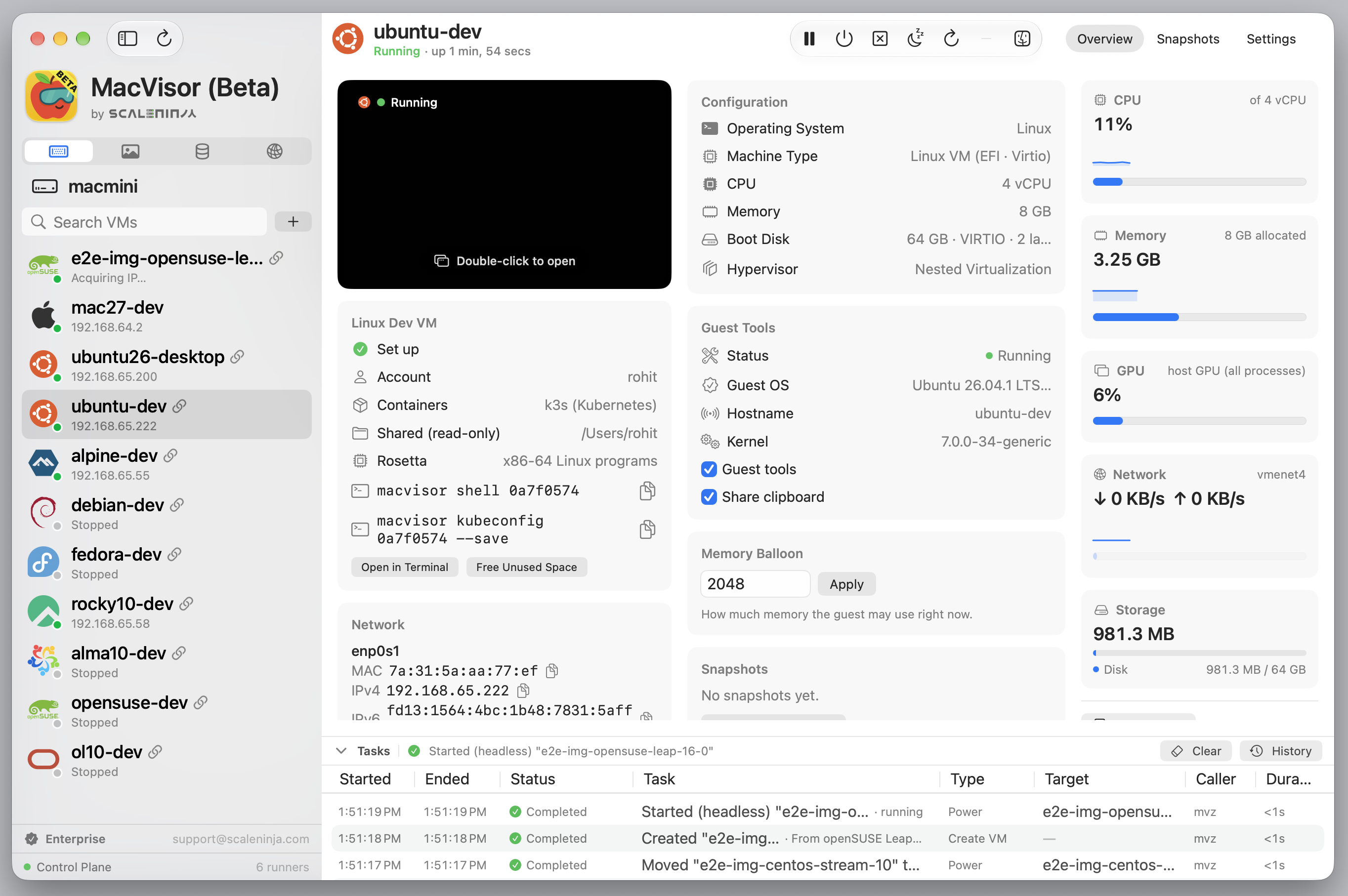
What you can do
- Linux VMs from cloud images. Ubuntu, Debian, Fedora, Rocky Linux, AlmaLinux, Oracle Linux, CentOS Stream, openSUSE Leap and Alpine. cloud-init sets up your account and SSH keys, and optionally a container runtime, a read-only share of your home folder and, on Ubuntu, a desktop. Any ARM64 ISO works too.
- macOS VMs from Apple's installers or your own IPSW. macOS 27 guests skip Setup Assistant and install the MacVisor Agent themselves.
- Windows 11 on ARM (Tech Preview), installed unattended from Microsoft's ISO. See Windows 11 guests.
- FreeBSD (experimental), 15.1 or a 16.0-CURRENT snapshot from the catalogue, used over SSH only. See FreeBSD (experimental).
- AI sandboxes (Tech Preview). Run a coding agent such as Claude Code, Codex or Goose in a disposable VM, and review its changes before they reach your project. See AI sandboxes.
- AI agents over MCP (Tech Preview). Let an agent on your Mac use the VMs you open to it, as far as you allow: run commands, take snapshots and roll back, start and stop VMs, and use their screens. See AI agents and MCP.
- Shells and containers.
mvz shellinto any VM, reach it as<vm>.mvz, and use its Docker or k3s from the Mac. - Snapshots and clones. Disk-only or live snapshots, templates, and linked clones that share their source's disk.
- Networking. NAT, bridging, VLANs, and named networks with DHCP, DNS, reservations, port forwards and a firewall the Mac enforces.
- Guest tools. Shared folders, clipboard, file transfer and port forwarding.
- An always-on host. Headless VMs that start at login, controlled from the menu bar or over SSH.
- Automation. Nearly everything the app does is available in
mvz, with JSON output. A few setup tasks are app-only.
Requirements
| Mac | Apple Silicon, macOS 27 |
| Linux guests | ARM64. x86 images don't boot; MacVisor does not emulate x86 |
| FreeBSD guests | Experimental. The catalogue's ARM64 images, used over SSH only |
| macOS guests | Automatic setup needs a macOS 27 guest. The MacVisor Agent supports macOS 14 and later |
| Nested virtualization | M3 or later |
Memory, disk space and network per guest are in System requirements.
macOS guests get Apple's accelerated graphics. Linux guests use Virtio graphics. Windows guests show on Virtio-MVZ (beta), MacVisor's own display device: any resolution, following the window, sharp on a Retina screen; Remote Desktop remains the way to a session with sound. FreeBSD guests have no display after their loader, so you use SSH.
How it works
A background service owns your VM library and starts one runner process per VM. The app and mvz are both clients of that service. Closing the app or a VM window doesn't stop a VM, and one VM failing doesn't affect the others.
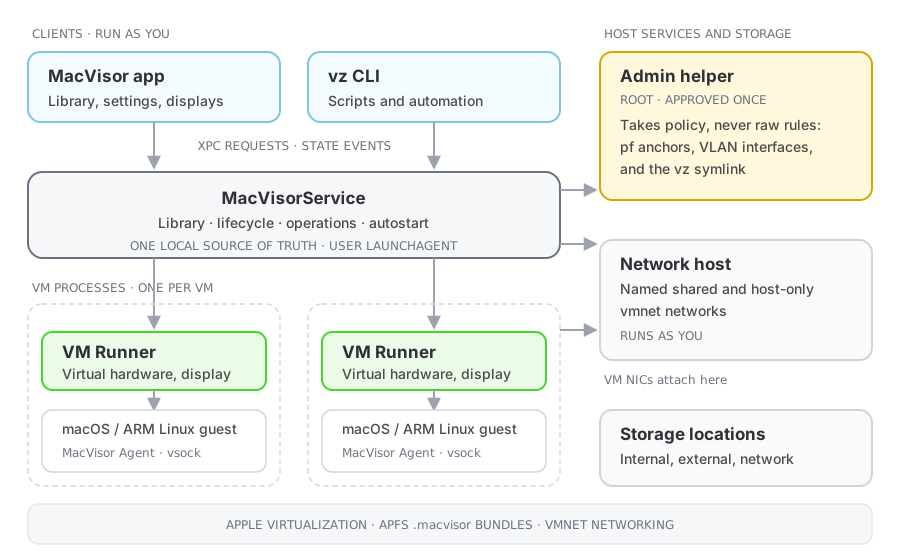
Each VM is a .mvz package that holds its configuration, disks, saved state and snapshots, and a template is a .mvzt one. Packages from earlier builds keep their .macvisor name and work as before. You can keep VMs in several storage locations and move them between them.
See Architecture for the components, and Security model for what runs with which privileges.
Acknowledgements
MacVisor uses Sparkle 2.10 for software updates, under the MIT licence. That licence also covers the bsdiff, sais-lite, ed25519 and SUSignatureVerifier code included in Sparkle.
The Linux guest agent is written in Go and includes the Go standard library and runtime, under the Go licence (BSD-style).
The guest operating system icons are their owners' logos and trademarks, used only to identify the system a VM runs. The macOS icon comes from Font Awesome Free (CC BY 4.0). Tux was originally drawn by Larry Ewing with The GIMP.