
 DeltaSnap
 DriveSync
 Noject
 DeltaSync
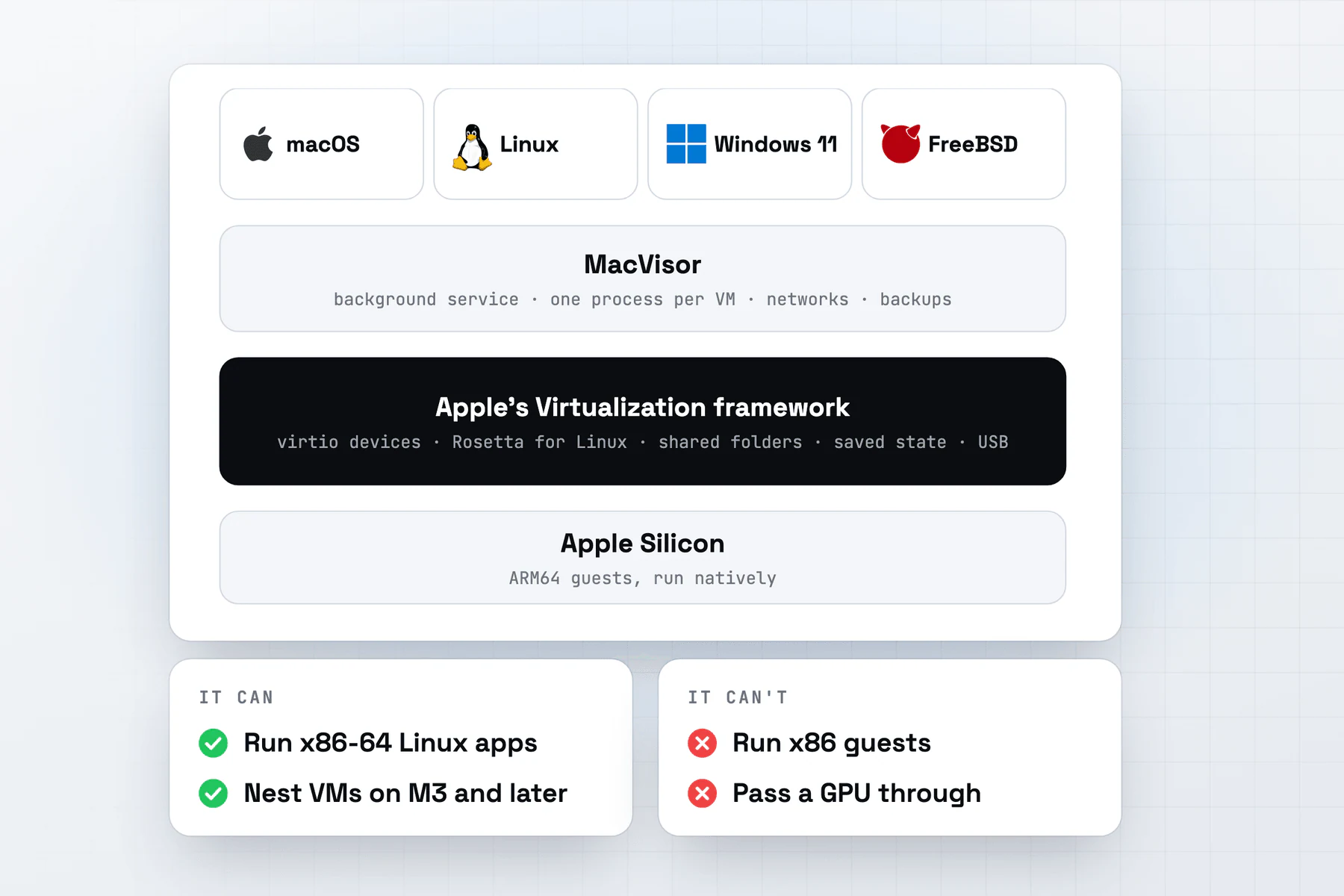
Many VM apps on a Mac are built on Apple's Virtualization framework, and so is MacVisor. Knowing what the framework does tells you what these apps can and can't do, and which differences come from the app.
What it is
The Virtualization framework is Apple's API for creating and running virtual machines. It arrived in macOS 11 and runs on Apple Silicon and Intel-based Macs. An app describes a VM, with its CPUs, memory, boot loader and devices, and the framework builds it and runs it.
The framework gives an app a virtual machine and its devices. Everything around that is the app's work: a library of VMs, installing each system, networks, snapshots, backups and a command line. That's why apps built on the same framework can differ so much.
Which guests it runs
Apple's documentation names two kinds of guest, macOS and Linux. On Apple Silicon both are ARM64.
| Guest | How it starts | Since |
|---|---|---|
| macOS | Installed from one of Apple's restore images (.ipsw). Apple Silicon only | macOS 12 |
| Linux, from its kernel | The framework loads a Linux kernel directly | macOS 11 |
| Linux, from an installer or a disk image | The EFI boot loader, which looks for a drive it can boot, as a PC's firmware does | macOS 13 |
| Other ARM64 systems that boot from EFI | The same EFI boot loader. Apple doesn't document any | macOS 13 |
Windows 11 on ARM and FreeBSD both start through the EFI boot loader in MacVisor. See macOS, Linux, Windows 11 and FreeBSD for each.
What it provides
- Virtio devices. Network, storage, console and serial ports, sockets between the guest and the Mac, an entropy source and a memory balloon from macOS 11, and sound and shared folders from macOS 12. An NVMe controller arrived in macOS 14.
- Graphics. macOS guests get a graphics device that exposes the Mac's GPU to the virtual Mac, so Metal runs in the VM. Linux guests have had a 2D virtio display since macOS 13: Linux draws each frame and hands it to the framework to show.
- Rosetta for Linux. From macOS 13, on Apple Silicon, an ARM64 Linux guest runs x86-64 Linux programs through Rosetta, shared into the guest as a folder. In macOS 27 it's part of macOS and needs no install.
- Shared folders. Mac folders appear in Linux guests over virtio-fs from macOS 12, and in macOS guests, mounted for you, from macOS 13.
- Networking. NAT through the Mac, and bridging to one of the Mac's network interfaces, both since macOS 11. Bridging needs Apple's
com.apple.vm.networkingentitlement, which Apple keeps for developers of virtualization software. From macOS 26, a network of the app's own can put several VMs on one segment. - Saving and restoring a VM. From macOS 14, a paused VM's state can be saved to a file and restored later into a stopped VM whose configuration matches.
- Nested virtualization. From macOS 15, a guest on the framework's generic platform, such as Linux, can run its own hypervisor. Apple says it's available on Macs with the M3 chip and later.
- USB. Disk images attached as USB drives from macOS 13, attached to a running VM from macOS 15. From macOS 27, a USB device plugged into the Mac can be passed through to a VM, through Apple's new AccessoryAccess framework.
- iCloud in macOS guests. From macOS 15, a VM made from a macOS 15 or later restore image gets an identity of its own, derived from the Mac's Secure Enclave, and can use iCloud. An older VM upgraded to macOS 15 can't.
What it can't do
- x86 guests. On Apple Silicon the framework doesn't boot or install Intel Linux distributions, and no x86 system runs. Rosetta runs x86-64 programs inside an ARM64 Linux guest, and Windows 11 on ARM has its own emulation for x64 apps.
- GPU or PCI passthrough. There's nothing in the framework to hand a guest the Mac's GPU or any PCI device. USB devices are the exception, from macOS 27.
- 3D graphics for Linux or Windows. Only macOS guests get the GPU. Linux's 2D virtio display leaves 3D to software. Apple doesn't document a display for Windows: in MacVisor, Windows draws with the Mac's CPU, on MacVisor's own display device, Virtio-MVZ, or on Apple's at 1024 x 768.
- A third macOS VM. Apple's macOS license allows up to two more copies of macOS in virtual machines on each Mac, for software development and testing, macOS Server, or personal, non-commercial use. The framework enforces a limit too: a VM that would go past it doesn't start. The limit covers every app and user on the Mac, and Linux and Windows VMs don't count toward it.
- macOS guests on Intel. A macOS guest needs an Apple Silicon Mac.
- Nested virtualization everywhere. It needs an M3 or later, and macOS guests don't have it.
Which apps build on it
Every app that runs macOS VMs on an Apple Silicon Mac uses it, because Apple offers macOS virtualization there only through this framework. Some apps use it for every guest, and some only for macOS, with an engine of their own for the rest:
| App | Uses the framework for |
|---|---|
| MacVisor | Every guest: macOS, Linux, Windows 11 and FreeBSD |
| Parallels Desktop | macOS VMs only. Windows and Linux run on Parallels' own hypervisor |
| UTM | Its Apple Virtualization backend, for macOS guests and Linux with Rosetta. Its other backend is QEMU |
| VMPal | macOS and Linux. Windows runs on VMPal's own engine |
| VirtualBuddy | macOS and ARM Linux VMs |
| Tart | macOS and Linux VMs |
| Anka | macOS VMs on Apple Silicon. Anka on Intel Macs uses a hypervisor of its own |
| Lima | Its vz mode, the default on macOS since Lima 1.0 |
| Docker Desktop | One of its virtual machine managers on a Mac |
VMware Fusion runs its own hypervisor and doesn't use the framework, so it can't run macOS guests on an Apple Silicon Mac.
The framework's limits apply to every VM on it, in any app. Two macOS VMs at a time is a limit for the whole Mac, across apps and users, so a macOS VM in Parallels and another in MacVisor use up both. See MacVisor vs. Parallels, MacVisor vs. UTM, MacVisor vs. VMware Fusion and the best VM software for Mac for how they differ.
What MacVisor adds on top
MacVisor uses the framework for the VMs themselves and builds the rest:
- A background service, and one process per VM. VMs keep running when the app quits or crashes, a crash stops only its own VM, and VMs start at login without the app. See Architecture and One process per VM.
- Networks and a firewall. Named networks with DHCP reservations and port forwards, VLAN interfaces, and a firewall the Mac enforces outside the guests. See Custom networks and Network firewall.
- Secure Boot and a TPM for Windows. UEFI Secure Boot with Microsoft's keys, and MacVisor's own TPM 2.0, sealed to the Mac's Secure Enclave, so Windows 11's checks pass and BitLocker works. Linux VMs can have the TPM too. See TPM and Secure Boot.
- Snapshots, linked clones and backups. Live and disk-only snapshots, linked clones that share a disk, and scheduled backups to another drive or a share while a VM runs. See Snapshots, Linked clones and Backups.
- Guests set up for you. Linux from cloud images with your account and SSH keys, macOS 27 with automatic setup, Windows 11 installed unattended, and the MacVisor Agent for clipboard, files and a clean shutdown. See Guest tools.
- The
mvzcommand line. Nearly everything the app does, from Terminal, over SSH or in a script. See Using the CLI.
MacVisor keeps the framework's limits: ARM64 guests only, two macOS VMs at a time, and no GPU acceleration for Linux or Windows guests. See Known limitations for the full list.