
 DriveSync
  Noject
  DeltaSync
 See every snapshot
Every snapshot on every tracked volume with its age, label, tags, and private size, whichever tool created it.
 DeltaSnap
Free 30-day trial
DeltaSnap
Free 30-day trial
Your Mac already takes
APFS snapshots
and leaves you tmutil and a Disk Utility menu to manage them. DeltaSnap is the missing layer:
list, label, tag, hold, mount, diff, and restore snapshots on every APFS volume, with a searchable
index of every file they hold and retention you set, from a native app or a ZFS-style
dsnap CLI.
One license, all your household Macs · Secured by Polar · Signed & Notarised · macOS 15+ · Designed for single-user Macs
Install with Homebrew
$ brew tap scaleninja/tap && brew trust --tap scaleninja/tap$ brew install --cask deltasnapAlready have Time Machine?
Because macOS already takes APFS snapshots and does almost nothing with them. Time Machine writes one roughly every hour and discards it after about a day. You cannot label it, diff it, or decide to keep it. DeltaSnap manages those snapshots and its own, on every APFS volume you track, with retention you set, a diff between any two points, and single-file restore.
It is not a backup. Snapshots share the volume, so they die with the disk. Keep Time Machine, Carbon Copy Cloner, or Arq for hardware loss and theft, and use DeltaSnap for the mistakes that happen far more often.
| APFS snapshots | macOS alone | With DeltaSnap |
|---|---|---|
| Where | Startup disk, hourly, while Time Machine is on | Any tracked APFS volume, on demand or on a schedule |
| Lifetime | About 24 hours, then purged | Retention you set, with holds for keepers |
| Labels and tags | Timestamp only | Labels plus searchable text or JSON tags |
| What changed | No diff | Added, removed, modified, replaced, and moved paths between any two points |
| Getting a file back | Enter Time Machine, or mount by hand with mount_apfs | Search by name, Quick Look, restore a copy or replace in place |
| Other tools' snapshots | Each app sees only its own | Time Machine, CCC, SuperDuper, and Arq snapshots mounted, diffed, and restored from, never pruned |
| Tooling | tmutil, Disk Utility | Native app, Finder menu, and a dsnap CLI with HEAD~1 selectors |
What macOS leaves out
Every APFS Mac is already carrying snapshots: the hourly ones Time Machine leaves behind, and the ones cloning and backup tools take before they copy. macOS offers tmutil and a Disk Utility menu to look at them. DeltaSnap gives you one window for every snapshot on every tracked volume, a signed helper that mounts and restores from them, and a CLI that scripts the lot.
Every snapshot on every tracked volume with its age, label, tags, and private size, whichever tool created it.
Compare any two indexed snapshots and review added, removed, modified, replaced, or moved paths.
Search deleted files by name, Quick Look any version, then restore a copy or replace the original behind a safety snapshot.
Schedules, safety snapshots that expire on their own, holds for keepers, and thinning under low space. Other tools' snapshots are never pruned.

Why it is this fast
Speed here is not an optimisation, it is the storage model. An APFS snapshot is copy-on-write metadata, so taking one copies nothing. It records the state of the filesystem and returns. Your history then lives on the same physical disk as the volume it captures, which is why getting a file back is a local copy rather than a trip to a backup destination.
Milliseconds
However much the volume holds. Cheap enough to do before every risky command, installer, bulk edit, or agent run, because there is never a reason to skip one.
No copy
A snapshot starts out sharing every block with the live volume. It only begins to cost space as the volume moves on from what it captured.
Always there
No backup disk to connect, no server to reach, no destination to wake or authenticate against. Every managed volume carries its own history.
The trade is the same thing that makes it fast. Snapshots share the volume, so they cannot survive that volume being lost, erased, or stolen. DeltaSnap is the fast layer, not the last one. Keep a real backup for that, and use DeltaSnap for the mistakes that happen far more often.
Command Line Interface
For developers, system administrators, and power users who miss ZFS storage ergonomics, the bundled dsnap CLI brings snapshot controls to macOS. List volumes, create snapshots, mount them for inspection, delete them deliberately, and diff from Terminal.
Safety checkpoints for scripts. Wrap an installer, migration, or agent run in dsnap snapshot --safety so the checkpoint expires on its own, then attach searchable text or JSON metadata with dsnap tag.
Relative snapshot references. Use HEAD for the newest snapshot and HEAD~1 for the previous one when comparing or mounting from scripts.
Automation-friendly. Use the CLI for repeatable list, APFS volume creation, snapshot, tag, mount, unmount, hold, unhold, destroy, schedule, index, license-status, and diff flows.
$ dsnap list -t container
NAME    USED    AVAIL   REFER   MOUNT                  DEV                       ID
disk3   182.4G  311.2G  182.4G  -                      Contains data             -

$ dsnap create -o mountpoint=/Users/rohit/Documents disk3/Documents
Created APFS volume "Documents" (disk3s6) on disk3.
Persisted mount at /Users/rohit/Documents via /etc/fstab.

$ dsnap list
NAME        USED    AVAIL   REFER   MOUNT                   DEV           ID
data        152.4G  311.2G  152.4G  /System/Volumes/Data    /dev/disk3s5  6C2FB...
documents   30.0G   311.2G  30.0G   /Users/rohit/Documents  /dev/disk3s6  D42CD...

$ PRE=$(dsnap snapshot --safety documents@pre-upgrade)

$ dsnap tag "$PRE" '{"task":"os-upgrade","phase":"pre"}'
tagged documents@com.scaleninja.DeltaSnap.safety.2026-07-27T06-05-10Z.pre-upgrade

$ POST=$(dsnap snapshot --safety documents@post-upgrade)
$ dsnap diff "$PRE" "$POST" --format=tree
Users/
  rohit/
    Documents/
      + new-config.json
      M package.json
      DMGs/
        - old-binary.dmg

$ dsnap hold "$POST"
held documents@com.scaleninja.DeltaSnap.safety.2026-07-27T06-08-42Z.post-upgrade
Works with what you already run
Your Mac is probably already carrying snapshots DeltaSnap did not create. Time Machine leaves local ones behind between backups; Carbon Copy Cloner, SuperDuper, and Arq each take their own before they copy. DeltaSnap treats them as ordinary history: mount them, compare them, and restore single files out of them, at no extra cost in space because they already exist.
Diff a Time Machine snapshot from this morning against a DeltaSnap checkpoint from ten minutes ago.
Pull a single file out of another app's snapshot without starting that app's full restore flow.
DeltaSnap never rotates, expires, or thins another tool's snapshots, and protects them from its own pruning by default.
One Track Volume switch per volume. Turn it off and DeltaSnap leaves that disk completely alone.
Features
Create, label, tag, hold, mount, and destroy snapshots on any tracked APFS volume, on demand or on a schedule.
Find live or deleted files across managed volumes from the app, a global shortcut, or Spotlight.
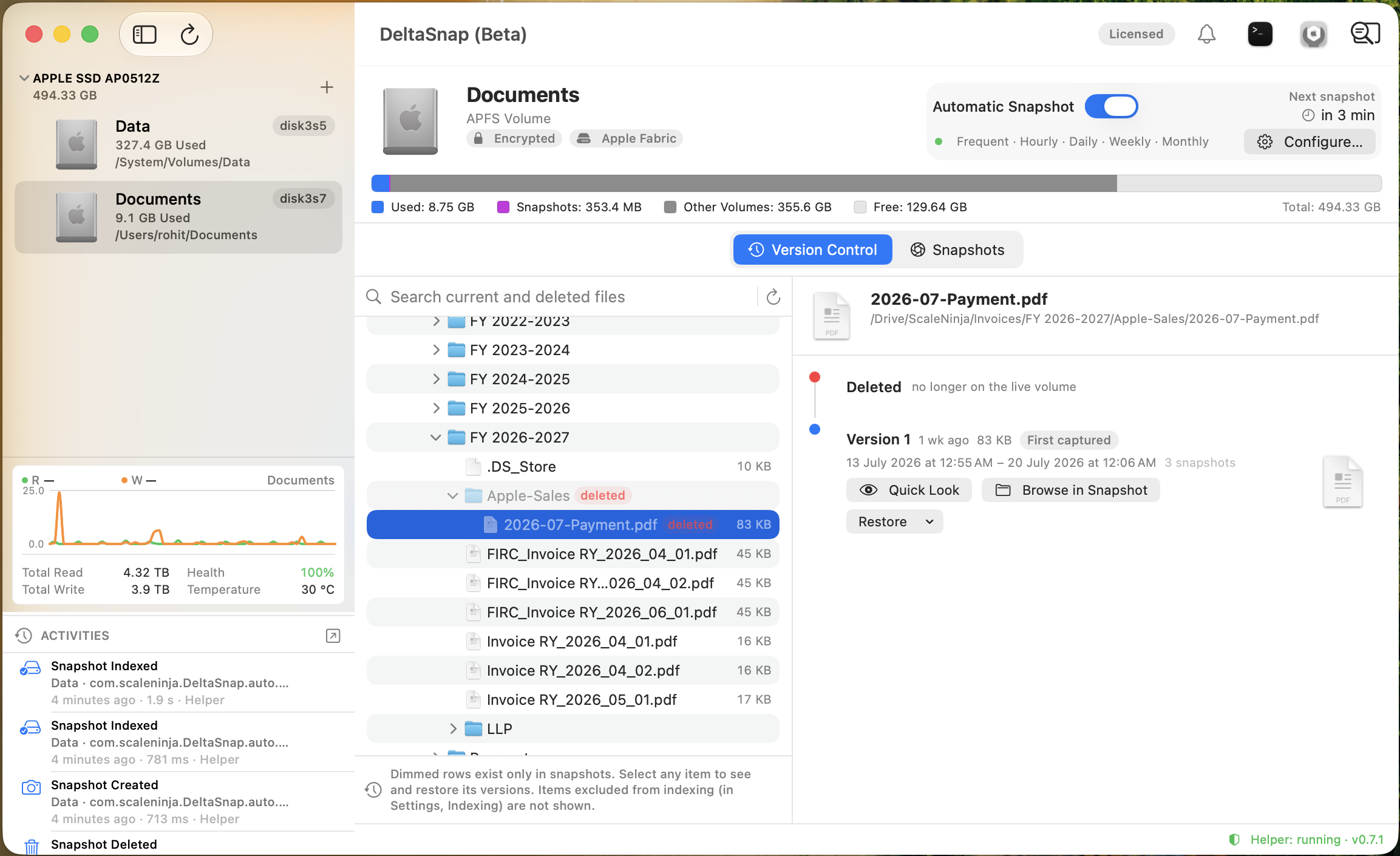
Browse a union of live and deleted files, inspect versions, preview them, and restore a copy.
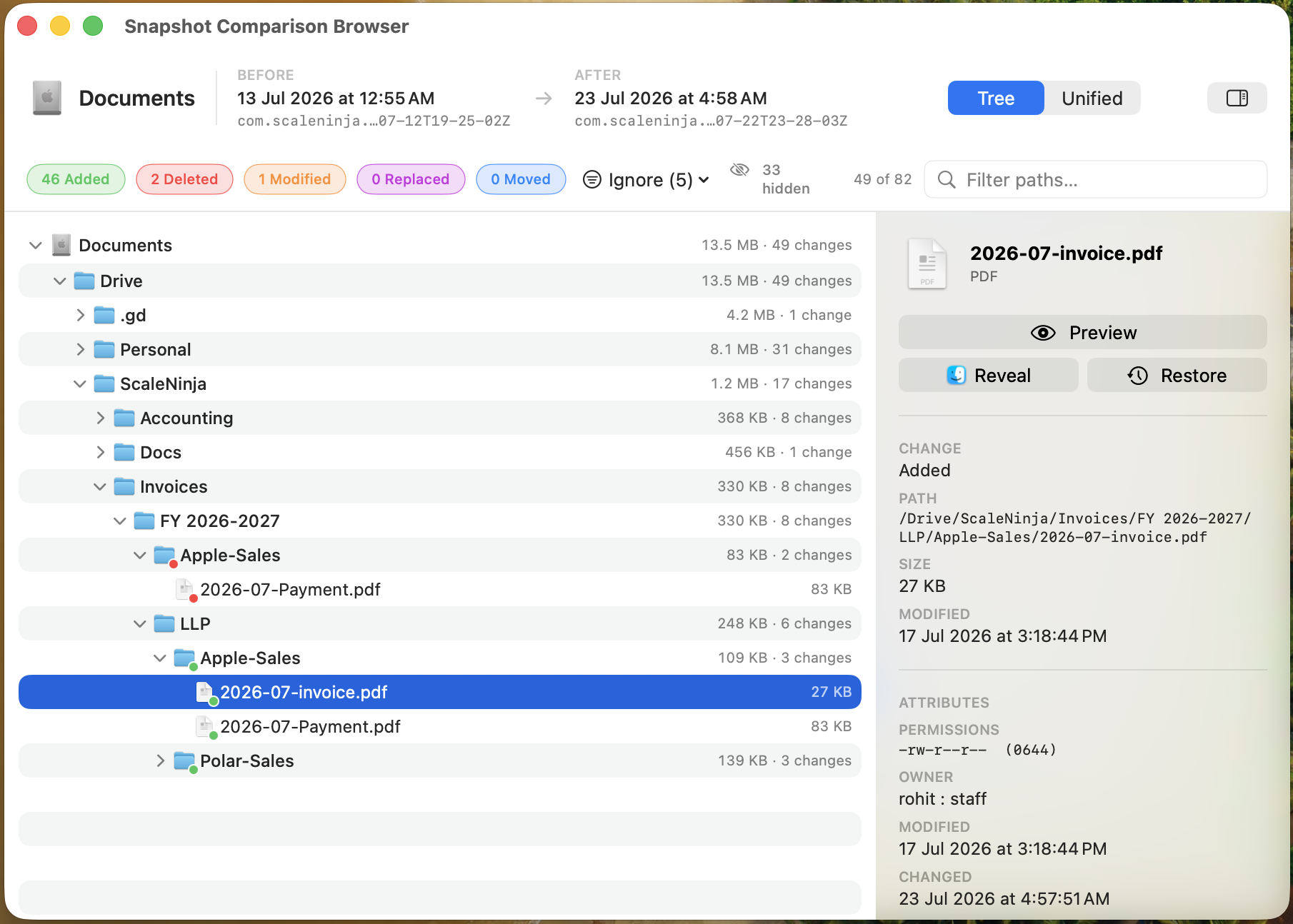
Compare two indexed points with added, removed, modified, replaced, and moved paths.
Rotate scheduled points, expire safety snapshots, protect keepers, and thin history under low space.
Inspect each snapshot's private size and the volume's snapshot usage alongside live disk activity and available SMART health data.
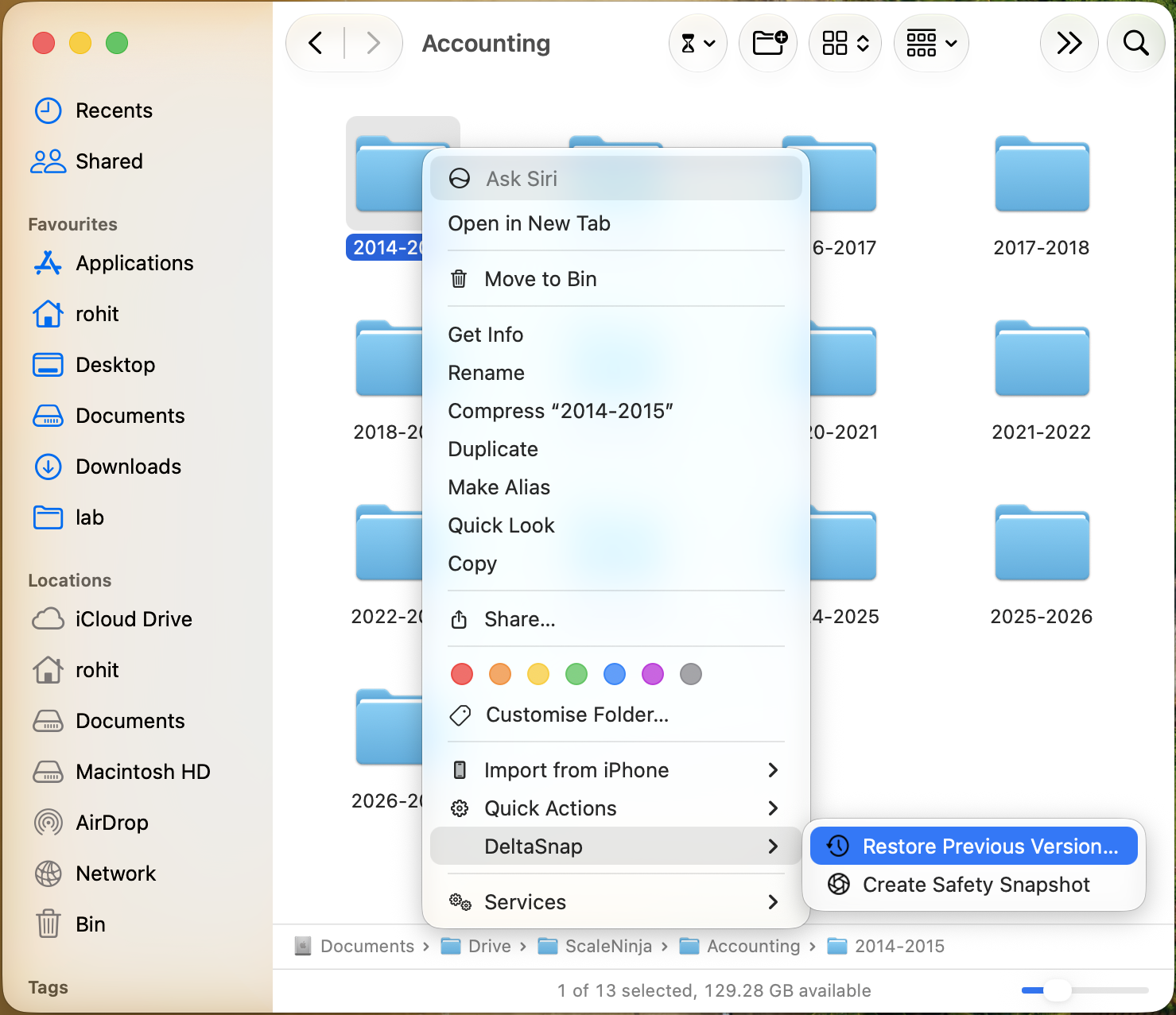
Restore previous versions or create a safety snapshot without leaving Finder.
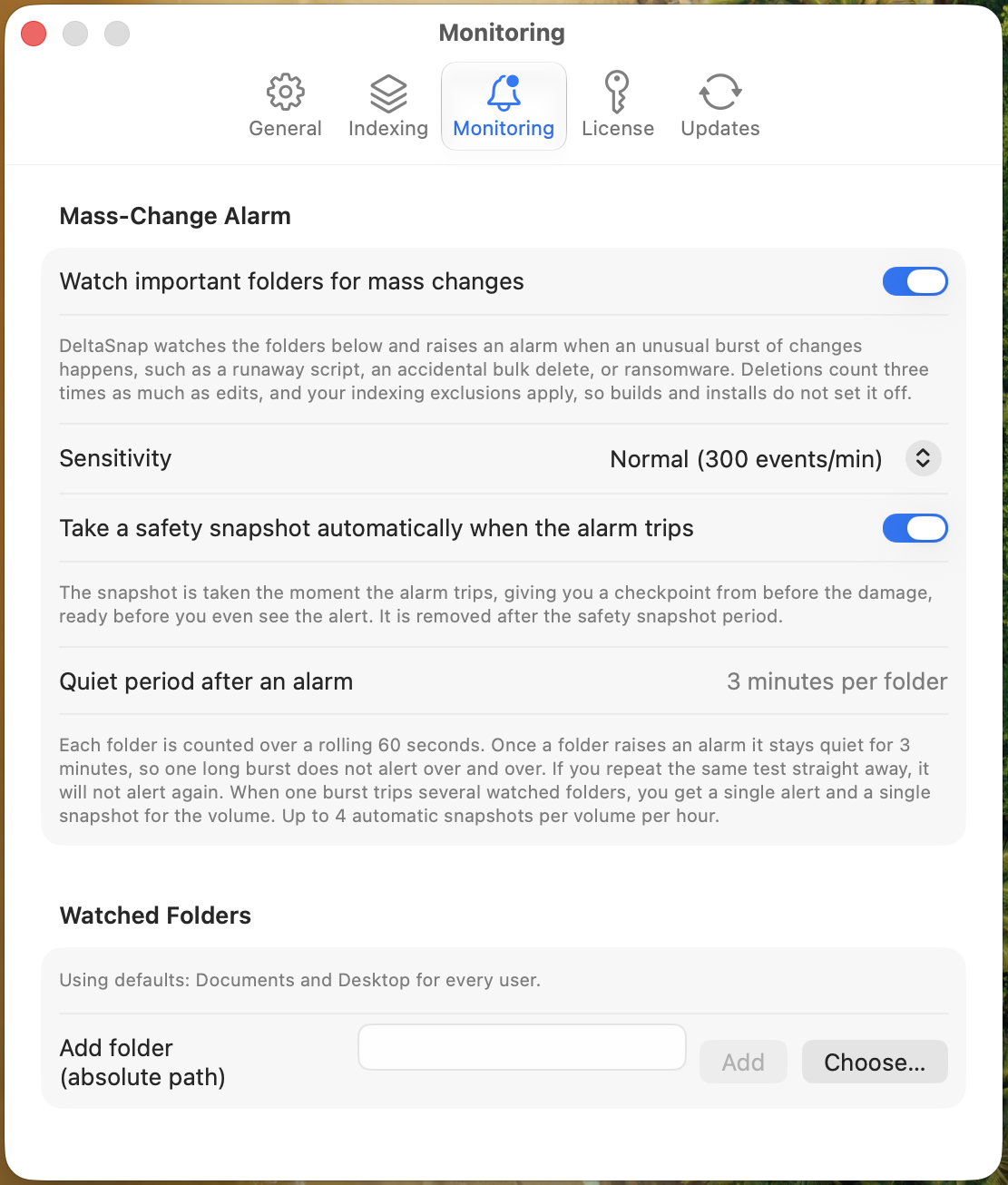
Watch folders and take a safety snapshot when changes arrive unusually fast. Critical alerts and digests go out through your own mail server for unattended Macs.
A ZFS-style dsnap CLI with HEAD~1 selectors for scripts, plus an open-source skill so coding agents checkpoint and diff their own changes.
Native where it matters
Every checkpoint is a standard APFS snapshot, visible to tmutil and Disk Utility and usable without DeltaSnap installed. DeltaSnap adds the searchable index, version timeline, tags, retention policy, activity and notification history, Finder surfaces, and signed helper around it. File and folder synchronization lives in DeltaSync, the free DeltaSync companion app.
Inside the app
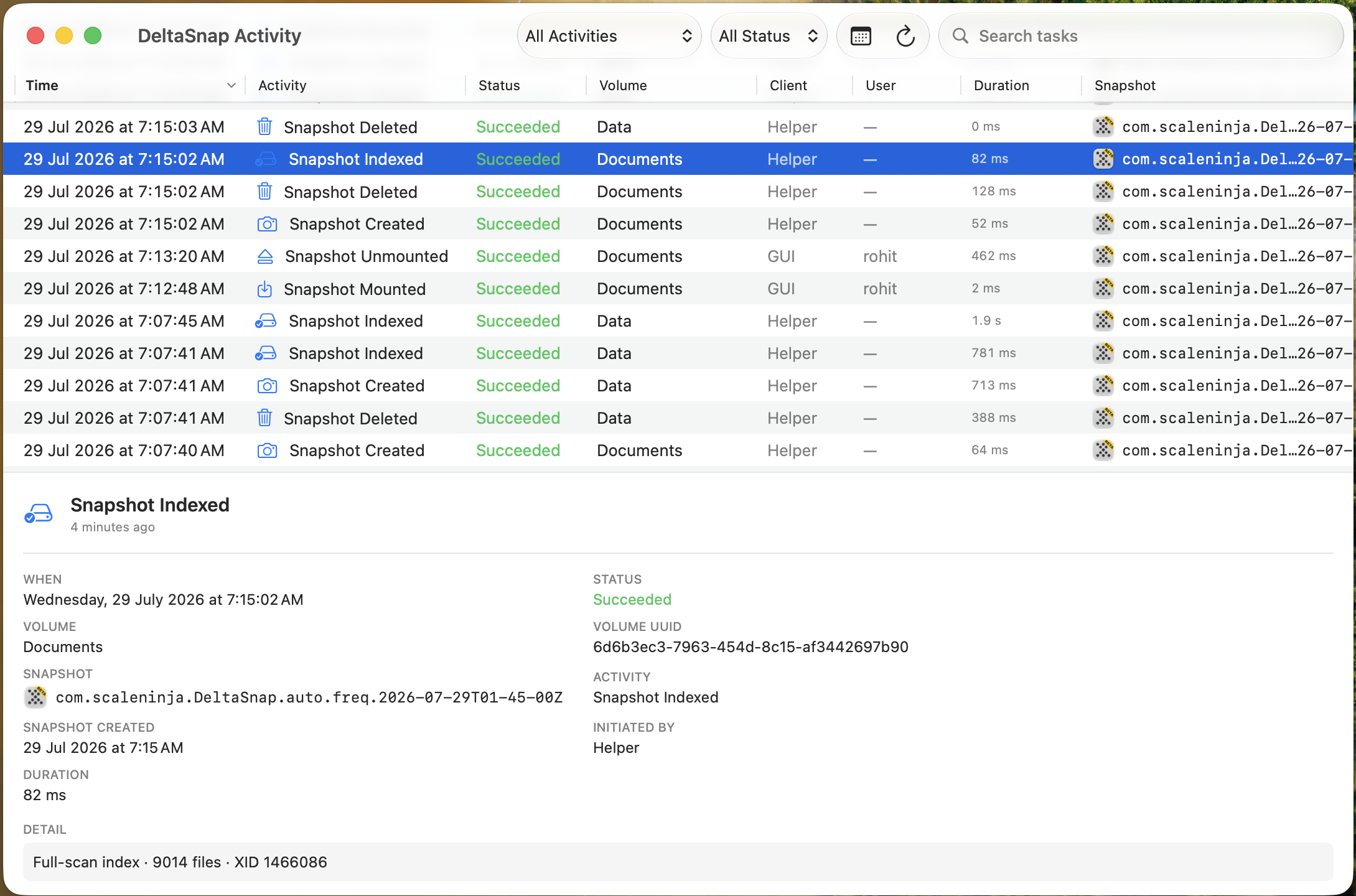
Version history, comparisons, Finder actions, monitoring, and an audit trail for every operation the background helper performs.
In their own words
Notes from customers, early users, and the Mac community.
Thanks for crafting and sharing DeltaSnap; have been on the lookout for a better alternative to tmutil localsnapshot.
This looks genuinely useful, and the APFS entitlement story is impressive.
it looks like an interesting product that I think could be very useful. Nice work!
it makes me confident that my money was well spent :)
love it so far
Much appreciated really
looks exactly what I need so far.
The software itself is genuinely impressive. The idea, Finder integration, and overall execution are very good from what I’ve tested.
I just installed this and it looks good.
Check it out in the r/macapps launch thread.
Scripts, installers, and agents
An installer, a migration script, a bulk rename, or a coding agent can change hundreds of files before you notice, and not all of them live in a git repository. DeltaSnap gives the whole volume a checkpoint and an audit trail: snapshot first, diff after, restore only what broke.
Git remains the right tool for source collaboration. DeltaSnap complements it by covering indexed files across the APFS volume, including work that is not committed to a repository.
One safety snapshot, from the CLI or the agent skill, tagged with the task, session, and phase, and set to expire on its own.
After the edit, the skill creates a second checkpoint and runs dsnap diff to surface unexpected paths.
Search by file, preview earlier versions, restore a separate copy, or replace only the damaged item instead of rolling back everything.
Mass-change monitoring can flag unusually rapid activity and take an additional safety snapshot when the configured threshold is crossed.
Open-source Agent Skill
The same portable SKILL.md works with Claude Code,
Codex, Cursor, GitHub Copilot, Gemini CLI, and other skill-aware tools that can run local shell commands.
It never deletes snapshots it did not create and never attempts a whole-volume rollback.
# Claude Code
/plugin marketplace add scaleninja/deltasnap
/plugin install deltasnap@scaleninja

# Universal install with GitHub CLI 2.90+
gh skill install scaleninja/deltasnap deltasnap \
  --agent codex --scope user
Snapshots vs backups
Because snapshots, local backups, and remote backups solve different recovery problems. DeltaSnap is the fast local checkpoint layer: use it before risky changes, compare what changed, and recover files in seconds. Keep external and remote backups for hardware loss, theft, and disasters.
| Failure mode | Snapshots | Local backups | Remote/offsite backups |
|---|---|---|---|
| Accidental delete or overwrite A file was removed, edited, or replaced by mistake. |
Best fit
Fastest recovery; browse or restore from a recent local checkpoint. |
Protects
Good fallback, usually slower than a mounted snapshot. |
Protects
Useful when local copies are unavailable, but restore is typically slower. |
| Malicious file changes Malware, ransomware, or a destructive script modifies many files. |
Best fit
Mass-change alarm can checkpoint automatically; recover files from the pre-attack snapshot without rolling back the volume. |
Protects
Protects well when the backup is disconnected, immutable, or versioned. |
Protects
Versioned, offsite, or immutable backups are the right recovery layer. |
| Drive failure The disk containing data dies. |
No
Snapshots live on the same APFS volume, so they fail with the disk. |
Protects
Restore from a separate disk or clone. |
Protects
Protects even if the local backup disk is not available. |
| Computer theft The Mac is stolen or lost. |
No
The snapshots leave with the computer. |
Partial
Works only if the backup disk was stored separately. |
Protects
Restore to a replacement Mac from a copy outside the stolen device. |
| Site-wide disaster Fire, flood, hurricane, tornado, or loss of both Mac and nearby backups. |
No
Local checkpoints cannot survive loss of the physical machine. |
No
A nearby drive can be lost in the same event. |
Best fit
Offsite copies are the layer built for physical disasters. |
| Typical recovery speed How quickly you can get back to work. | Seconds to minutes Mount, browse, diff, or restore locally. | Minutes to hours Depends on disk speed, backup format, and restore size. | Hours or longer Depends on bandwidth, provider, and restore volume. |
Practical setup: use DeltaSnap for fast local undo and inspection, keep an external backup for drive failure, and keep a remote or offsite backup for theft and disasters. These layers complement each other; none of them replaces all the others.
Further reading
Engineering notes and guides from the team behind DeltaSnap: how the private APFS snapshot entitlement Apple granted ScaleNinja makes the app possible, when a separate APFS volume keeps snapshot history focused, and what changes in each release.
Learn when a separate APFS volume is useful, how it keeps snapshot history focused, and why you should always choose an empty mount point.
 Rohit Yadav
 Why we built DeltaSnap, how Apple granting ScaleNinja the private APFS snapshot entitlement made it possible, and what it can do today.
Rohit Yadav Compare
Native snapshot tools, file-history browsers, project version-control apps, and backup systems overlap in different ways. Compare checkpoints, search, diffs, recovery, automation, and failure boundaries.

Backup, snapshots & recovery
Closest full-featured alternative
Read comparison
Project file version control
Direct workflow alternative
Read comparison
Mac diagnostics & snapshot recovery
Direct snapshot-recovery alternative
Read comparison
Open-source APFS auto-snapshots
Direct technical alternative
Read comparison
Time Machine history & recovery
Direct history-browser alternative
Read comparison
Built-in macOS backup
Essential baseline and complement
Read comparisonPrivacy
DeltaSnap has no analytics and no telemetry. It connects to the internet for two things only: activating or deactivating a license, and checking whether a new version exists. Turn on email notifications and it also talks to the mail server you choose, and nothing else. Snapshots, file names, indexes, and schedules never leave your machine. Activate with an offline license and it makes no licensing requests at all.
Legal
Exactly what DeltaSnap and DeltaSync send, and what never leaves your Mac.
Read policyDocs
Activate online in one step, or ask us for an offline license and never connect at all.
How activation worksLegal
The end user license agreement you accept when you first run DeltaSnap.
Read agreement List, label, hold, diff, and restore APFS snapshots on every volume you track, from the app, Finder, or the dsnap CLI. Free for 30 days, then $49 once for all your household Macs.
