
 DeltaSnap
 DriveSync
 Noject
 DeltaSync

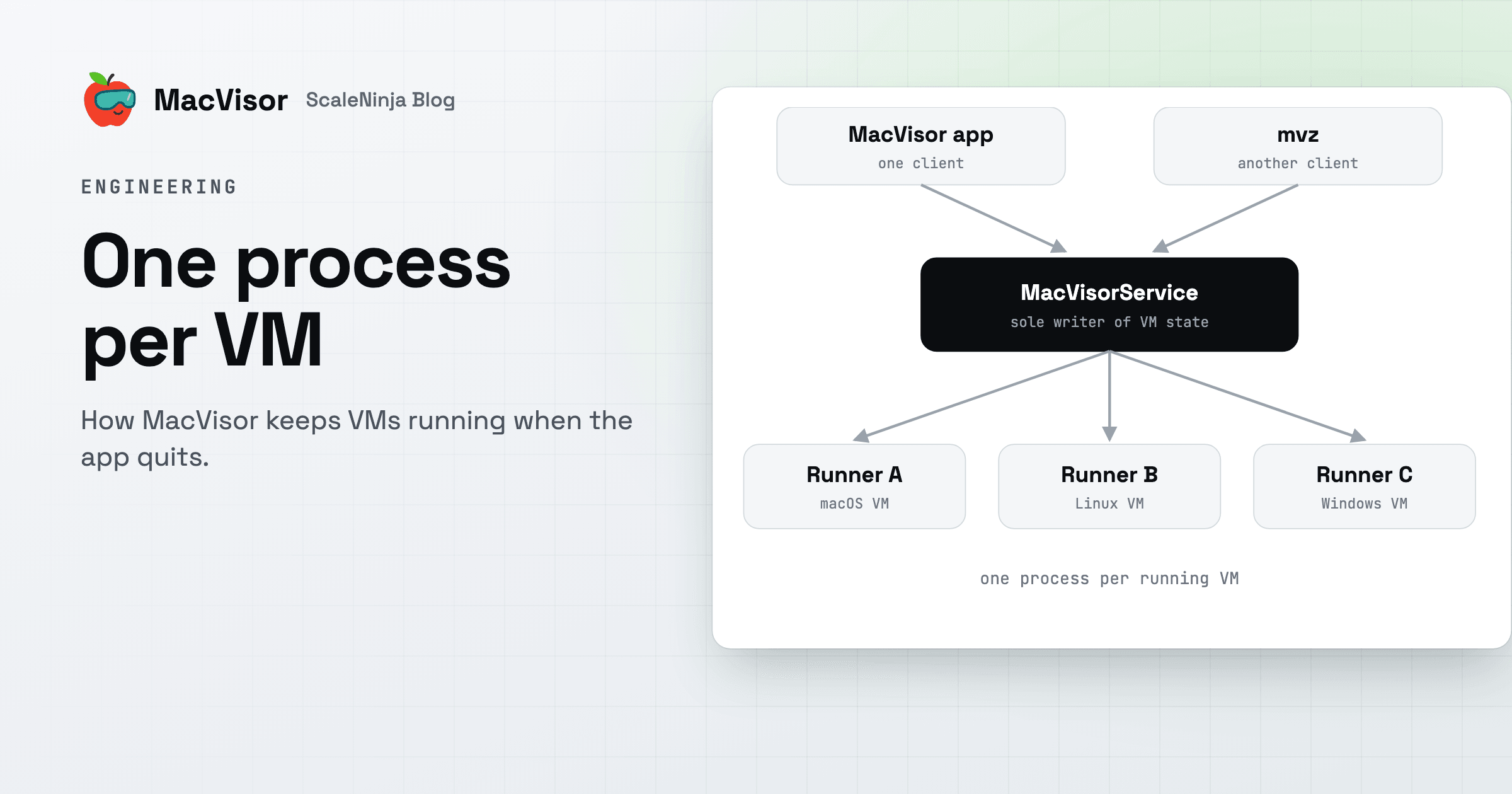
The simplest way to build a VM app on a Mac is to run the VMs inside the app. Then quitting the app stops them, and one crash takes all of them down.
MacVisor is built the other way round. The app is one client among several. A background service owns the VMs, and each running VM gets a process of its own. This post explains that layout, why we chose it, and what it changes for you.
Who does the virtualizing
Apple's Virtualization framework is the hypervisor. It runs each guest's virtual CPUs and memory in a system process of its own, which shows in Activity Monitor as com.apple.Virtualization.VirtualMachine. MacVisor doesn't replace any of that. What MacVisor decides is which of its own processes owns each VM, its window and its devices, and which process keeps the record of what exists.
The layout
  MacVisor app          mvz (macvisor)          mvz mcp serve
        \                     |                      /
         \_______ XPC: same user, signed by us _____/
                              |
                     MacVisorService
           (per-user login agent; sole writer of VM state)
          /            |              \                  \
  MacVisor VM     MacVisor VM     MacVisorNetworkHost    MacVisorAdminHelper
  "dev"           "win11"         (custom networks)      (root: pf, VLANs,
     |               |    \                               links, resolvers,
     |               |     MacVisorTPMEngine              license)
     |               |     (App Sandbox)
  Apple's Virtualization framework, one guest per runner
     |               |
MacVisor Agent in each guest, over a virtual socket| Component | Runs as | Job |
|---|---|---|
MacVisor app, mvz | You | Clients. They show state and ask for changes. Neither owns a VM |
| MacVisorService | You, as a login agent | Owns the VM library, starts runners, runs tasks, schedules, high availability and the license check |
MacVisorVMRunner (MacVisor VM.app) | You, one per running VM | Runs one VM, its display window and its devices |
| MacVisorNetworkHost | You | Holds the named shared and host-only networks |
| MacVisorTPMEngine | You, one per running VM with a TPM, sandboxed | The VM's TPM, with no network or file access |
| MacVisorAdminHelper | root, approved once | Firewall rules, VLAN interfaces, the mvz links, .mvz name lookups, and the Mac's license |
Architecture and the Security model have the full tables.
The service is the control plane
MacVisorService is a per-user LaunchAgent, registered with macOS as one of MacVisor's background items. It starts at login and launchd restarts it if it crashes. It doesn't run any VM inside itself.
It is also the only writer of VM state. Runners report what happens (a VM started, stopped, crashed, or was suspended) and the service records it. The app and mvz ask the service to change a setting or take a snapshot. They don't edit a VM's files themselves. With one writer, two clients can't overwrite each other's changes, and a rule such as deletion protection is enforced in one place for the app, the CLI, AI agents and sandboxes alike.
The service also does the work that has to happen when nobody is looking: starting VMs at login, high availability and its watchdog, health checks, hooks, scheduled backups and automatic snapshots, downloads, and installing MacVisor updates while the app is closed.
The app and mvz are equal clients
The app and mvz talk to the service over the same XPC interface, with the same typed requests. The service accepts a connection only from the same user, and only from code signed by our team.
That's why the CLI can do nearly everything the app does. It doesn't drive the app or read its files. It is a second front end to the same service. The MCP server for AI agents, mvz mcp serve, is a third. A VM you start with mvz start dev --headless shows up in the app as running, and one you pause in the app shows as paused in mvz list, because both read the one record the service keeps.
One runner per VM
Each running VM has its own runner process, the MacVisor VM app. It owns the framework's VM object, the VM's window, its display and sound devices, USB devices, port forwards and the connection to the MacVisor Agent in the guest. Activity Monitor and Force Quit list each runner by its VM's name.
The service launches each runner as a real app through LaunchServices, not as a bare executable. macOS features that ask the user for consent, such as USB accessory access, need an app identity to ask on behalf of, and the Dock can then show the VM's name on its tile.
What one process per VM buys:
- A crash stays with one VM. If a runner fails, that VM stops and the others carry on. With high availability on, the service starts it again.
- Closing a window doesn't stop anything. Closing a VM's window hides it, and the VM keeps running in its runner. Open it again from the app or with
mvz open. - The app can quit, crash or update. Runners don't depend on it. When the app comes back, it asks the service for the current state.
- The service can restart too. Runners keep running, including a macOS install in progress. The new service finds the live runners and reconnects to them, and high availability carries on.
- A VM's TPM is apart even from its runner. The TPM engine parses what the guest sends, so it runs in the App Sandbox in a process of its own. If it fails, the runner starts another from the saved state.
Networks outlive any one VM
A named network, with its DHCP reservations and subnet, has to exist whether or not a VM on it is running. macOS hands shared networks their subnets in the order they're made, so a network released when its last VM stopped could come back on a different subnet. MacVisorNetworkHost holds each custom network for as long as it's needed, and runners join it. NAT and bridged networking use Apple's networking directly and don't need it.
One root component, kept small
Everything above runs as you. Some things on a Mac need root: loading firewall rules into pf, creating VLAN interfaces, linking /usr/local/bin/mvz, writing the resolver files for <vm>.mvz names, and holding a license for every account on the Mac. MacVisorAdminHelper does those, and nothing else.
It answers only the app and the service, verified by code signature. It takes a firewall policy, never raw packet-filter text, and compiles the rules itself. It exits when idle unless a network's firewall is on. A compromised user-level process can only ask for what the firewall editor can already express.
What survives what
| Event | Effect |
|---|---|
The app or mvz quits, crashes or restarts | Nothing. VMs keep running |
| A VM's runner fails | Only that VM stops. High availability can restart it |
| The service restarts or updates | VMs keep running. Management pauses for a moment while the service reconnects |
| A MacVisor update | Running VMs keep their runner until you shut them down |
| macOS restarts, or the power goes | Every VM stops. VMs set to start at login start again at the next login |
What it costs
The design has costs too:
- macOS has to allow MacVisor's background items. If they're turned off in System Settings → General → Login Items & Extensions, the app can't reach the service. The setup assistant says so and offers to register them again.
- Updates take effect in stages. A VM started before an update keeps its old runner until you shut it down and start it again. VMs on custom networks keep the old network host until all of them have been stopped and started.
mvz service statussays when that's the case. - The Mac is still one machine. A macOS restart or a power cut stops every VM. One process per VM contains a crash; it isn't a cluster.
Why it matters
The layout is what lets one install serve three uses: VMs in windows on a desktop, an always-on host such as a Mac mini home server, and scripts or AI agents driving mvz with nobody at the screen. In each case the VMs belong to the service, not to whatever window or terminal happened to start them.
Download MacVisor for a free 30-day trial with every single-Mac feature, and see Architecture for the details.