
 DeltaSnap
 DriveSync
 Noject
 DeltaSync

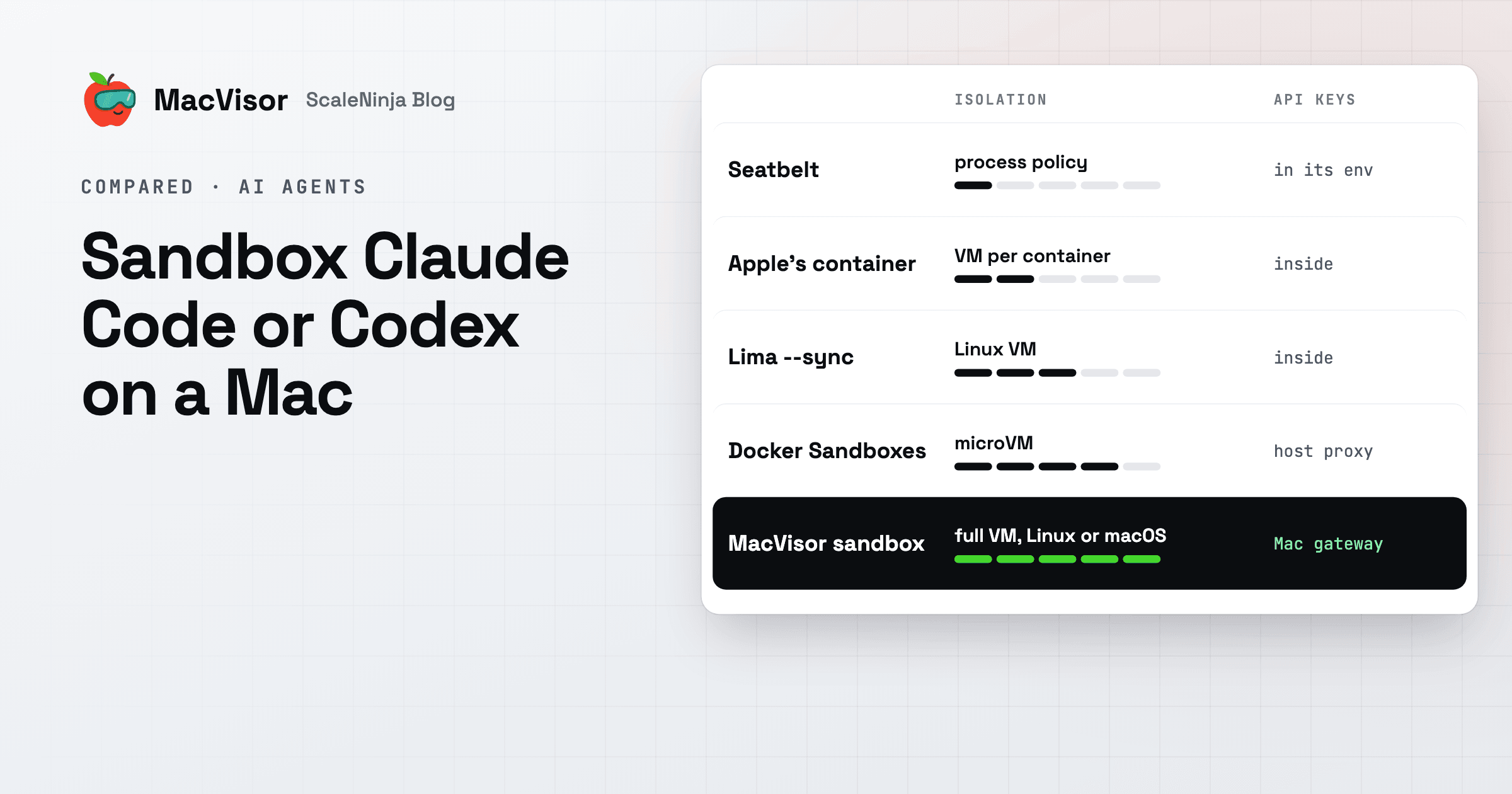
Claude Code, Codex CLI and Gemini CLI are most useful with their permission prompts off. On a Mac that means they run commands as you, next to your SSH keys, your cloud credentials and every other project you have. The vendors say to run them somewhere they can't do much harm, and leave the where to you.
This post compares the options on a Mac today: macOS's own sandbox (Seatbelt), Apple's container, Lima and Colima, Docker, and a full VM. We make MacVisor, the last option, so read that section with that in mind.
What you're protecting
- Files: your other projects,
~/.ssh,~/.aws. - Keys: API keys in variables or
.envfiles, your SSH agent, git credentials. - The network: what the agent can read, it can send anywhere it can reach, including your LAN.
- Things that run later: a changed git hook, CI file,
package.jsonscript or agent settings file runs on your Mac after the session.
Our step-by-step guide covers the risks in more detail.
Why network controls aren't optional
A sandbox decides what an agent can read. The network decides whether any of it leaves. With prompts off, an agent reads READMEs, issues, web pages and package code that other people wrote, and any of them can carry instructions. Anthropic's own docs put it plainly: "any approach that allows network egress can still leak data the agent can read". So for an unattended agent, three network controls are part of the boundary, not extras:
- Deny by default, then allow what the task needs: the model's API and the package registries the project uses. An agent that can reach any host can send your code, its key or its environment to any host.
- Keep it off your local network and your Mac. A VM or container on ordinary NAT can reach what your Mac can: the router's admin page, a NAS, printers, other VMs, and services on the Mac itself, such as a dev database or a model server listening on every interface. An allow list written for the internet doesn't cover those unless it says so, and your LAN is where the things without passwords tend to live.
- Enforce it outside the guest. Rules inside the sandbox, such as iptables in a container, are only as strong as the agent's lack of root there, and an agent that installs packages often has it. A proxy or packet filter on the host is out of its reach.
Two more matter once you run several agents. Keep them apart, because traffic between machines on the same network often isn't filtered at all. And if your filter covers only IPv4, close IPv6, or it's a second way out.
Most of the options below do one or two of these. The side-by-side table shows which.
1. macOS's own sandbox (Seatbelt)
Claude Code, Codex and Gemini CLI can each wrap their commands in Seatbelt, the sandbox built into macOS. Nothing to install and no VM. The boundary is a policy on a process: same kernel, same user account, same disk.
Claude Code's /sandbox. According to Anthropic's sandboxing docs, Bash commands can write only to the working directory, a temp directory and folders you add. Reads are allowed across the whole computer by default, and the docs say plainly that this "still allows reading credential files" such as ~/.ssh. Environment variables, secrets included, are inherited. Network traffic goes through a proxy with an allow list that starts empty. You can deny or mask specific files and variables, but "there is no built-in credential deny list".
Two catches matter for unattended runs. Only shell commands are sandboxed: file tools, hooks and MCP servers run on the host. And in bypass-permissions mode, which --dangerously-skip-permissions turns on, a host outside the allow list is allowed without a prompt, unless you set strictAllowlist. Anthropic's sandbox environments page says the Bash sandbox alone "is not sufficient for fully unattended runs", and recommends a container, a VM or its sandbox runtime (srt claude, a beta that puts the whole Claude Code process inside Seatbelt).
Codex. Its sandboxing docs describe three modes. The default, workspace-write, lets Codex edit inside the project and keeps .git, .codex and .agents read-only, and network access is off unless you turn it on. --dangerously-bypass-approvals-and-sandbox (also --yolo) removes the sandbox entirely, so "no prompts" and "sandboxed" don't go together here.
Gemini CLI. Sandboxing is opt-in with --sandbox. The default macOS profile, permissive-open, confines writes to the project but allows broad reads and network access; stricter profiles exist.
Apple's man page marks sandbox-exec, Seatbelt's command-line front end, as deprecated, though it still works on macOS 27.
Good for: fewer prompts during work you're watching. Not for: walking away with prompts off.
2. Apple's container
Apple's container tool runs each Linux container in its own lightweight VM. It's free (Apache 2.0), needs an Apple Silicon Mac with macOS 26 or later, and is at 1.7.1, released on 6 November 2026.
container system start
container run -it --rm --volume "$PWD:/work" ubuntu:latest bash
The boundary is good: a separate Linux kernel per container, and it sees only what you mount (read-write unless you add :ro) and the variables you pass. Your SSH agent goes in only if you ask with --ssh.
It has nothing made for agents, though. Your API key goes in, where the agent can read it. The networking docs cover isolated networks between containers but no egress filter or allow list, so a container reaches whatever the Mac's network does, LAN included, unless you filter it yourself. Changes come back through the mount, live, with no review step.
Good for: a quick, clean Linux box with only the project in it, if you'll handle keys and network yourself.
3. Lima and Colima
Lima runs Linux VMs from YAML templates and is free and open source; 2.3.0 came out on 6 November 2026. It has a page for AI agents.
Mind the default first: Lima's default template mounts your home folder read-only, so an agent in it can read ~/.ssh. The AI page recommends mounting only the project (limactl start --mount-only .:w), or better, no mounts and its sync mode:
limactl start --mount-none template:default
limactl shell --sync . default claude "Add error handling to all functions"
--sync copies the project in with rsync, runs the agent, then asks whether to accept the changes, with an option to view the diff. Use 2.3.0 or later: earlier versions had a low-severity flaw where the guest could change files after you approved the diff, enough to plant a git hook. Lima also has an experimental MCP server and experimental macOS guests.
The gaps: API keys go into the VM (as variables or a sign-in), and the AI page describes no network restrictions.
Colima builds on Lima to run Docker. Its default config mounts $HOME writable, which is convenient for containers and the opposite of what you want for an agent. If you use it, change the mounts first.
4. Docker: dev containers and Docker Sandboxes
Dev containers. Anthropic publishes a reference dev container with a default-deny iptables firewall inside the container that allows only the hosts Claude Code needs, and says it supports --dangerously-skip-permissions. The config lives in the repository, which suits teams. Its own warning: a malicious project can still take "anything accessible inside the container, including the Claude Code credentials". The project is bind-mounted, so edits land on your Mac as they happen. Docker Desktop is free only for personal use, education and small businesses (under 250 employees and $10 million revenue).
Docker Sandboxes. Docker's sbx is built for exactly this job, and it's strong. Each sandbox is a microVM with its own kernel and Docker daemon, and it doesn't need Docker Desktop. Per its security page, a proxy on the host adds your credentials to outgoing requests and "the raw credential values never enter the VM", and outbound traffic goes through the host under a deny-by-default policy. Sandboxes can't reach each other or your host network directly. The CLI and local sandboxes are free, including for commercial work, and it installs with Homebrew on macOS 14 or later on Apple Silicon. It supports Claude Code, Codex, Copilot, OpenCode and others.
sbx run --clone claude .Two defaults to change. The default mode mounts your working tree read-write, so changes appear on your Mac at once; --clone gives the agent its own git clone and you fetch what you want. And the default allow list is broad (it includes *.googleapis.com), so prune it with sbx policy ls. You also need a Docker sign-in, and the guests are Linux.
5. A full VM: a MacVisor AI sandbox
MacVisor runs full VMs on Apple Silicon Macs with macOS 27. An AI sandbox is a VM set up for one agent:
mvz ai keys set anthropic
mvz sandbox create ~/src/app --agent claude
mvz sandbox run app-1 -- "fix the failing parser test"
mvz sandbox diff app-1 --patch
mvz sandbox apply app-1- Boundary: a whole VM, Linux (Ubuntu 26.04, 2 CPUs and 4 GiB by default) or macOS 27 for Xcode work.
- Files: a copy of the working tree, without git history or ignored files. No shared folders, clipboard or USB, and MacVisor connects without forwarding your SSH agent.
- Keys: stay in the Mac's Keychain. A gateway on the Mac adds them to model requests on the way out, for Anthropic, OpenAI and OpenRouter, or the agent uses a local model.
- Network: an allow list enforced outside the VM, with presets such as
npmandpypi. The VM sits on a host-only network, MacVisor Sandboxes, whose firewall in the Mac's packet filter denies traffic in and out. So it reaches the models and the listed sites through MacVisor and nothing else: not your LAN, and not your Mac, unless an entry names one exactly.mvz sandbox createwon't make a sandbox while that firewall isn't in force. The gateway also refuses provider-side tools like web fetch that could reach sites around the list. - Changes: a diff made on your Mac with your git. Scripts, hooks, CI files and agent settings are flagged, and
applybrings in exactly what you reviewed, or onto a new branch. - Undo: a
pristinecheckpoint of the whole VM, running processes included.
Agents set up for you are Claude Code, Codex, Goose, Aider and OpenCode. Gemini CLI isn't one; with --agent none you'd install it yourself and its key would live in the VM.
Agents that need the open internet
Some agents don't fit an allow list: one signed in with a Claude or ChatGPT subscription, or one that runs all the time and browses, like OpenClaw. Give each a VM on a custom network of its own, with a firewall that allows the internet and denies the private address ranges, so it can't reach your router, NAS or the Mac:
mvz networks create agents
mvz networks firewall agents on --inbound deny --outbound allow \
  --deny out:any::10.0.0.0/8 --deny out:any::172.16.0.0/12 --deny out:any::192.168.0.0/16
mvz create ubuntu agent-1 --network agents
The firewall lives in the Mac's packet filter, so nothing in the VM can turn it off, and the Mac drops IPv6 on that network so the guest can't go around it. Traffic between VMs on one network isn't filtered, so give agents you need kept apart a network each.
On an office network, go one step further with a VLAN interface (Networks → New VLAN Interface…). Use it as the custom network's uplink, and the agent's traffic leaves the Mac tagged onto a segment your router and switches already keep away from staff machines, with MacVisor's firewall in front. When other devices must reach the agent, bridge its VM to the VLAN interface instead, and let that segment's rules do the filtering: MacVisor's firewall applies to custom networks, not bridged adapters.
The weaknesses are real. It's the heaviest option, with gigabytes of memory per sandbox and about a minute to make one. Your editor doesn't see changes until you apply them. A Claude or ChatGPT subscription sign-in needs open internet for that sandbox, so use a firewalled network as above. A Mac runs at most two macOS VMs. Sandboxes on the allow-list network can reach each other, which Docker's can't, and an allowed site on a shared CDN can open the way to others on it. AI sandboxes are a Tech Preview, and MacVisor is paid after a 30-day free trial, with a one-time Pro license.
Side by side
| Boundary | Agent can read | API keys | Network | Changes come back | Cost | |
|---|---|---|---|---|---|---|
Claude Code /sandbox | Process policy, your account | Whole disk by default | In its environment | Allow list in a proxy on the Mac; bypass mode allows new hosts unless strict | Live, in your tree | Free |
Codex workspace-write | Process policy, your account | Not limited in the docs | In its environment | Off by default | Live, in your tree | Free |
Apple container | Lightweight VM per container | What you mount | Inside | No egress filter | Live, through the mount | Free |
Lima --sync | Linux VM | A copy of the project | Inside | No limits described | Prompt with a diff | Free |
| Dev container | Container in Docker's VM | The mounted project | Inside | Default-deny firewall inside the container | Live, through the mount | Docker Desktop terms |
| Docker Sandboxes | microVM | Project (mount or clone) | Injected by host proxy | Deny by default through the host, broad list | Live, or git fetch | Free locally |
| MacVisor AI sandbox | Full VM, Linux or macOS | A copy of the project | Injected by Mac gateway | Allow list on the Mac, firewalled host-only network | Reviewed diff, then apply | One-time license |
Which to pick
- You watch the agent and want fewer prompts: the agent's own sandbox, Claude Code's
/sandboxor Codex'sworkspace-write. Nothing to set up. Don't treat it as the boundary for--dangerously-skip-permissions. - A Linux project and you want it free: Docker Sandboxes, with
--cloneand a trimmed allow list. It keeps keys out of the VM, which most free options don't. - You already live in Lima, or want everything open source: Lima 2.3 or later with
--mount-noneand--sync. Accept that keys sit in the VM, and use a low-limit key. - A team that wants the same setup everywhere: Anthropic's reference dev container, committed to the repo.
- Just a clean, throwaway Linux shell: Apple's
container, mounting only the project. - An agent that needs the open internet or runs all the time: a VM on a firewalled network of its own, or behind a VLAN, as above. Not just another machine on your LAN.
- You need macOS or Xcode in the sandbox, want keys never in the guest, an allow list the agent can't touch, or a reviewed diff as the only way back: a full VM. That's what we built MacVisor's AI sandboxes for, and the how-to has the steps.
Layering is fine too. Anthropic's docs suggest running the Bash sandbox inside a container or VM for a second boundary.
Common questions
Is --dangerously-skip-permissions safe with Claude Code's sandbox on?
Not on its own, per Anthropic. Hooks, MCP servers and file tools run outside it, and in that mode new hosts are allowed without asking. Use a container, a VM or the sandbox runtime.
Can the agent push with my SSH key or git credentials?
On the Mac, yes, unless you deny those files. In a container or VM, only if you mount ~/.ssh, forward your SSH agent or hand it a token. Keep pushes on the Mac, after you review.
Can the agent read my Mac's Keychain?
Not from a Linux container or VM: it isn't there. In a macOS VM, it gets the VM's own Keychain, not yours.
Can an agent in a VM or container reach my home or office network?
Usually, yes. On ordinary NAT it reaches what your Mac reaches, LAN included. Docker Sandboxes send outbound traffic through a deny-by-default proxy, and MacVisor's allow-list sandboxes reach your LAN only through an entry that names a device exactly. For anything else, put the agent on a network with a firewall outside the guest that denies the private address ranges.
Does a sandbox stop prompt injection?
No. It limits what an injected instruction can read, where it can send it, and what lands in your code.
More on MacVisor's approach: AI sandboxes, AI agents and MCP, and MacVisor vs. Lima.