
 DeltaSnap
  DriveSync
  Noject
  DeltaSync
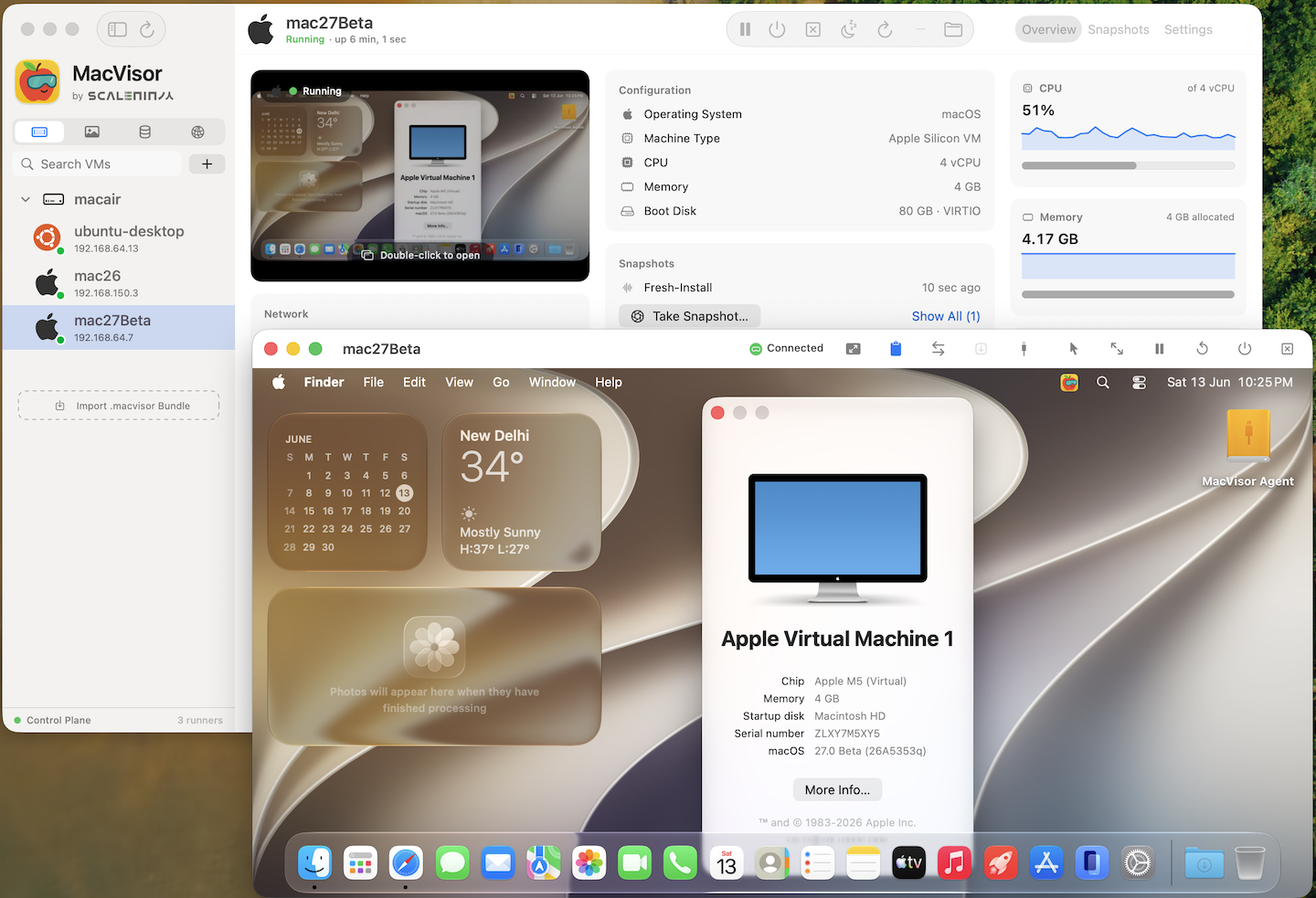
MacVisor 27.2.0 is out, and it's our first general release after several months in public/private beta. Thank you to everyone who installed it, filed bugs and told us what was missing. Most of what changed since then came from you.
If you're new to it: MacVisor is a native virtual machine manager for Apple Silicon, built on Apple's own Virtualization framework. It runs macOS, Linux, Windows 11 (Tech Preview) and FreeBSD VMs that are set up for you in minutes: your account, SSH keys, guest tools and drivers, with no installers to click through.
The problem
Running VMs on an Apple Silicon Mac usually means one of two things: a subscription for a polished tool, or an afternoon of setup with a free one. Find the right image, click through the installer, create an account, add your SSH keys, install guest tools and drivers, then wire up networking. Do that for every new VM, and again when one breaks, and it adds up.
Then you want a VM to keep running after you close the app, or on a headless Mac mini, or under a script, and most desktop tools stop there.
Built like a hypervisor, not just an app
An always-on background service owns the VMs, and each VM runs in its own isolated process. VMs keep running when you close the window, and one crashing doesn't take down the others. The architecture section has the details.
That gives you three ways to use the same install:
- The app for desktop virtualization.
- The
mvzCLI for CI and lab automation. It does nearly everything the app does. - A headless host for server Mac minis and Mac Studios, with auto-start at login and high availability per VM.
Guests, set up for you
- Linux: Ubuntu, Debian, Fedora, Rocky Linux, AlmaLinux, Oracle Linux, CentOS Stream, openSUSE and Alpine, from the cloud images each vendor publishes. You get your account, your SSH keys and the guest agent, plus Docker, Podman or k3s if you want them. Ready in a couple of minutes. Tick Install Ubuntu Desktop for a GNOME desktop, or bring your own Linux ISO.
- macOS 27.2, 26, 15 and 14: installed from Apple's installers, or your own IPSW. macOS 27 guests skip Setup Assistant entirely.
- Windows 11 on ARM (Tech Preview): installed unattended from Microsoft's ISO in about 10 minutes, with drivers, Remote Desktop and sound, on MacVisor's own display at any resolution. As far as we know, MacVisor is the first to run Windows 11 on ARM natively on Apple's Virtualization framework.
- FreeBSD (experimental), and appliances such as pfSense-based, OPNsense-based or OpenWrt.
mvz create ubuntu dev --runtime docker
mvz shell dev
More in guests and the cloud image catalogue.
Networking you'd normally need a server for
- NAT, bridged, and your own named networks (shared or host-only), with DHCP, DNS and fixed addresses.
- VLANs and port forwards, for segmenting a homelab, an office or a test lab.
- A firewall per network, enforced on the host Mac with pf, so you can build an isolated lab or put a router VM in front of others.
Because FreeBSD and appliances boot too, a VM can be your router, load balancer or other virtual network function. As a proof of concept we built armsense, an ARM64 FreeBSD and pfSense-based firewall and router distro that runs on MacVisor. We don't know of another virtualization platform that brings a host firewall, VLANs and network appliances to the Mac.
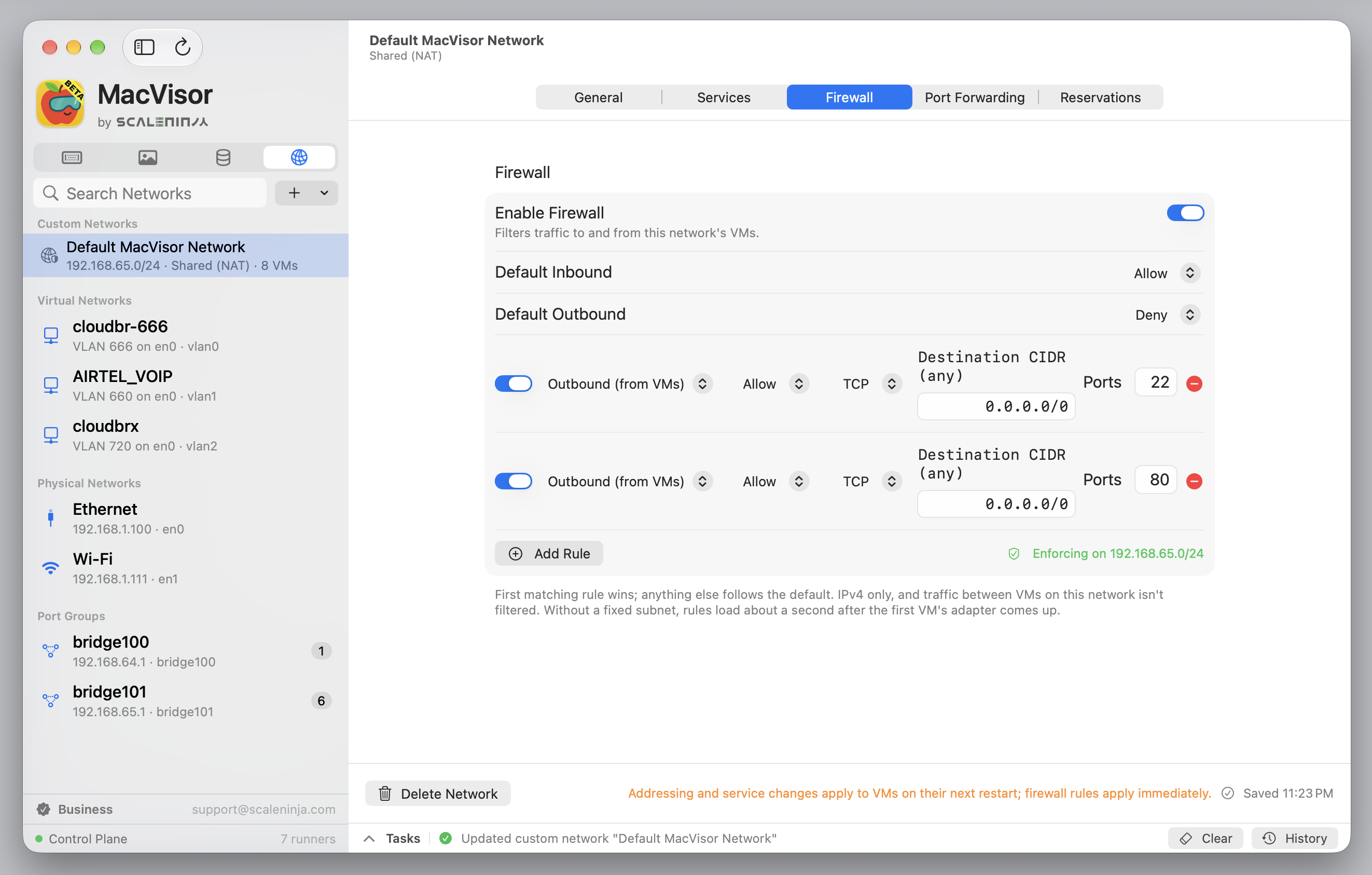
See the networking docs for more.
Storage
Live snapshots (with memory) and disk-only snapshots, linked clones, templates, export and import, and ASIF disks. MacVisor also handles shared folders, several storage locations, APFS file cloning, USB storage passthrough, and moving VMs with their disks between storage locations.
One feature came straight from Mac admins in the beta: back up a running VM by exporting a snapshot. The VM keeps running. The backups guide shows how, including scripts for other backup tools.
Guest integration
mvz shellandmvz execinto any VM.- Clipboard sharing, drag-and-drop file transfer and port tunnels.
- Clean shutdowns and restarts through the guest agent.
- Live guest information: addresses, disks and more.
AI sandboxes and MCP (Tech Preview)
Run a coding agent in a disposable VM, or let your AI agent use the VMs you open to it over MCP. Models can run locally on your Mac or in the cloud, and API keys stay on the Mac. More in AI sandboxes.
How it compares
These are all good tools, for different people:
- Parallels Desktop is very polished, with broader 3D support for Windows. It's subscription-first: Standard is $99.99 a year, Pro $119.99 and Business $149.99, and the one-time Standard license is $219.99. MacVisor 27 Pro is $59 once, and adds per-network firewalls, VLANs and an always-on background service.
- VMware Fusion is free. It doesn't run macOS guests on Apple Silicon, and doesn't set up cloud images for you.
- UTM is free and open source, and uses QEMU to emulate other CPU architectures, which MacVisor doesn't do. Guests are mostly set up by hand.
- Tart and VirtualBuddy are great for macOS CI and macOS guests. MacVisor covers Linux, Windows and FreeBSD too, with a full app and host networking.
What we're really after is the gap on the Mac where Proxmox, ESXi, KVM or Hyper-V would be on a server. MacVisor is built for Macs as infrastructure: for developers, creators and power users, for homelabs and server Macs, and for small businesses and enterprises. The detailed comparisons go feature by feature.
Pricing
- Free 30-day trial with every feature. No sign-up, no credit card, no email.
- Fair after the trial: your existing VMs keep working. A license is only needed to add new VMs (create, clone or import).
- MacVisor 27 Pro: $59 once per Mac, with every 27.x update and a 14-day money-back guarantee. Use code MVZ10 for $10 off at launch.
- Business ($79 per Mac per year) and Enterprise (by quote) add priority and SLA-backed support, training, customisation, and help with design and deployment.
Buying late in a version's life isn't a gamble either: a Pro license bought in the few months before the next major version ships includes it at no extra cost. The pricing docs have the details.
Does it pay for itself? In most cases, within days to a few weeks. Setting up a Linux, macOS or Windows VM by hand typically costs 30 to 60 minutes of hands-on time; with MacVisor it's a couple of minutes. Try the calculator with your own numbers.
And for a smile
Our official music video, "MacVisor Sets Me Free".
Try MacVisor 27
MacVisor requires macOS 27 on an Apple Silicon Mac, and speaks 11 languages.
We'd love to hear what you build with it, and what you'd like next. Questions, feature requests and bug reports go to support@scaleninja.com.