
 DeltaSnap
  DriveSync
  Noject
  DeltaSync
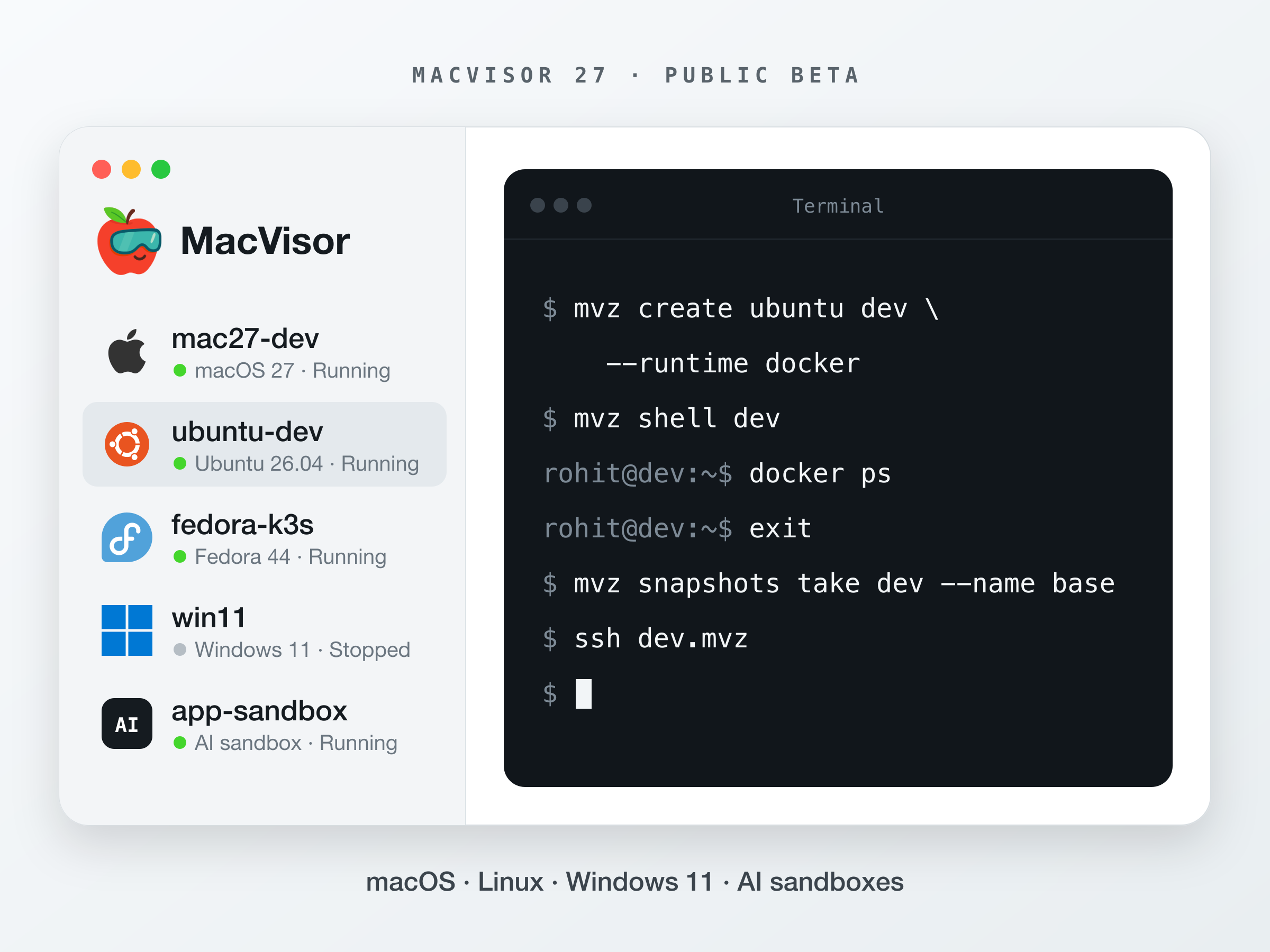
MacVisor runs macOS, Linux and Windows virtual machines natively on Apple Silicon, and manages them the way a hypervisor host would. VMs run in the background whether or not the app is open. You get snapshots, templates, linked clones, named networks with a firewall, and an mvz command line that can do nearly everything the app does.
The public beta is out today. Here is a two-minute overview, then why I built it and what it does.
I wanted a hypervisor host, and I had a Mac
I have spent most of my career on the server side of virtualization. I'm a committer and PMC member on Apache CloudStack, and I've spent years building and breaking KVM hosts. On a hypervisor host, VMs keep running whether anyone is logged in or not. Networks have names, addresses are reserved, and the firewall belongs to the host. Templates and clones are routine, and everything can be scripted.
Then Apple Silicon arrived, and the Mac mini on my desk became one of the best small servers I had ever owned: quiet, cool, low power, and fast. Apple's Virtualization framework runs macOS and ARM Linux guests on it at close to native speed. The hardware and the hypervisor were both there.
The tools around them were not built for that job. I tried what the Mac already has:
- Desktop VM apps are built around a window and a person sitting in front of it. They are good at that, and the host-side work (networks, firewall, unattended start, scripting) comes second.
- CI tools treat a VM as a disposable job. They do that well, but a long-running dev VM or a small lab on its own network is a different job.
- Container tools cover containers. I also needed real kernels, real init systems, and macOS guests.
What I wanted fit in between: quick Linux dev VMs with my account and SSH keys, Docker or k3s when I ask for them, and no heavyweight desktop product. macOS VMs for testing releases. A Mac that boots, starts its VMs and keeps them running headless, like any host in a rack.
The last reason came later. Part of why I built DeltaSnap was to see exactly what AI coding tools were doing to my Mac. Seeing the damage afterwards is useful. Not letting the agent touch the Mac in the first place is better, so MacVisor can run it inside a VM you throw away.
Built like a host, not a window
Most of the design follows from one decision: the app is a client, not the place your VMs live.
A background service owns the VM library and starts one runner process per VM. The app and mvz are clients of that service, and both see the same state. Close the app or a VM's window, and the VM keeps running. If one VM crashes, the others are unaffected.
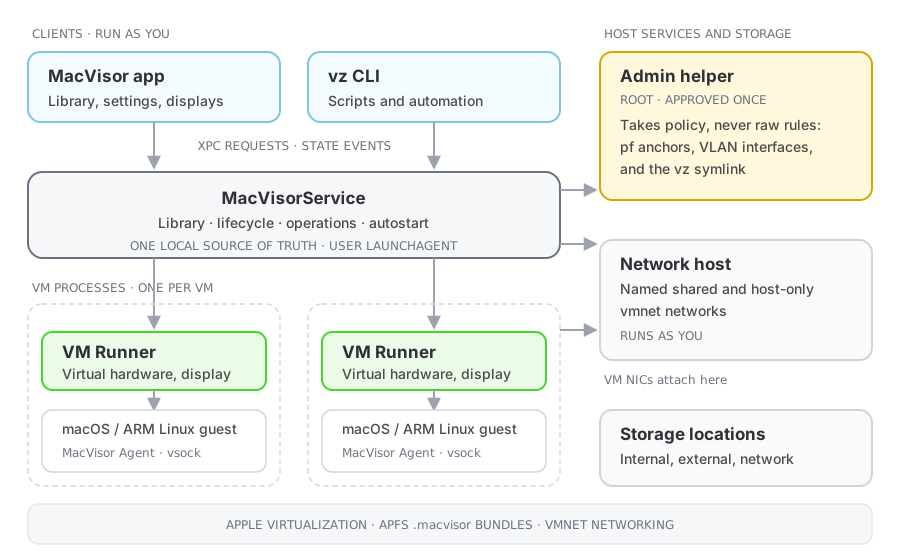
That one choice gives you three ways to work with the same install: a desktop app with VM windows, an always-on host whose VMs start at login, and a scriptable platform you drive entirely from the terminal.
What MacVisor does
Linux dev VMs in one command
mvz create ubuntu dev --runtime docker
mvz shell dev
docker --context macvisor-dev ps
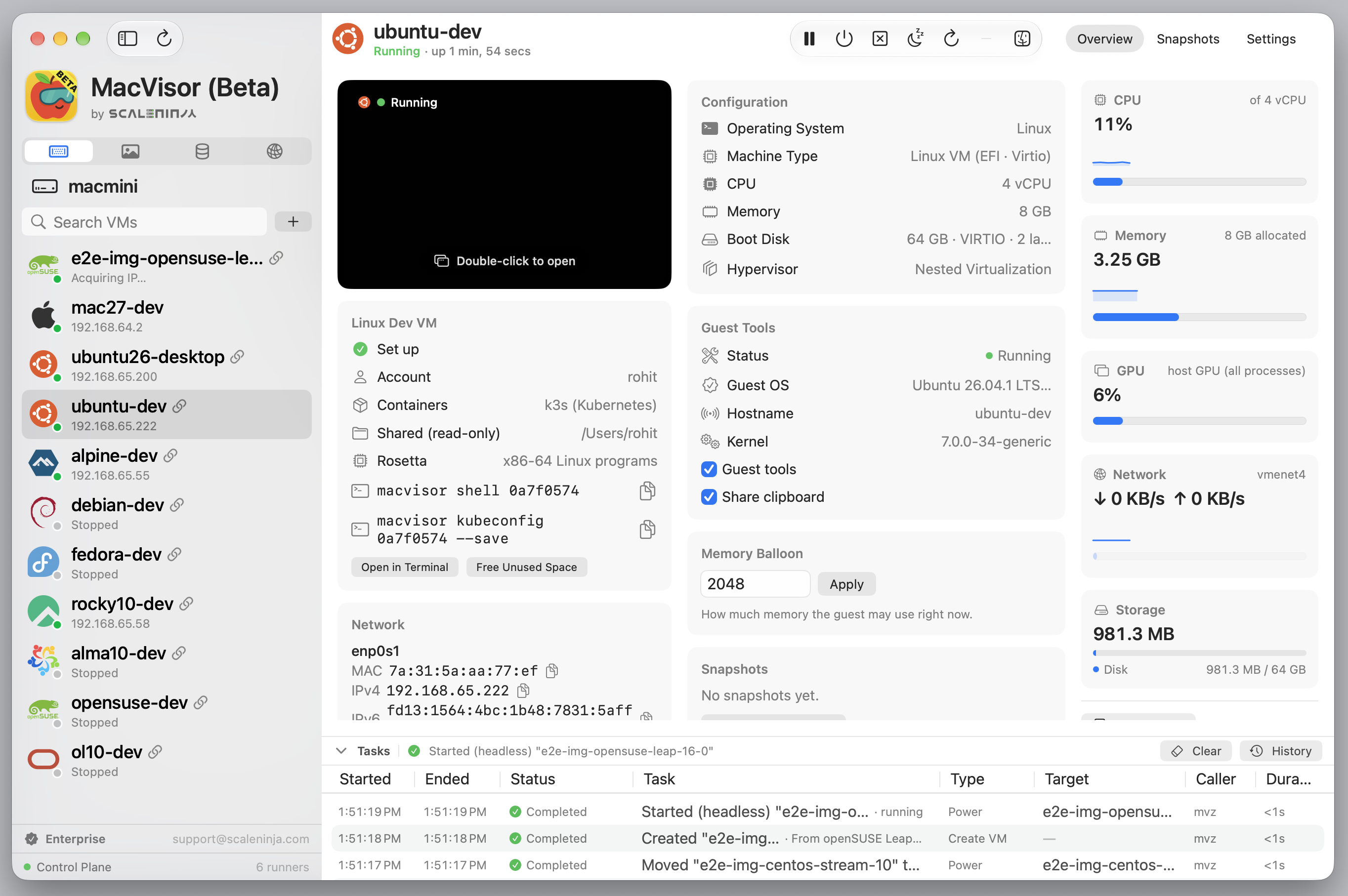
create downloads Ubuntu's cloud image once, verifies it, and keeps it as a template. Each new VM is a linked clone that stores only its own changes. On first boot, cloud-init creates your account, installs your SSH keys and the MacVisor Agent, and adds the container runtime you chose: containerd, Docker, Podman or k3s.
The catalogue covers Ubuntu, Debian, Fedora, Rocky Linux, AlmaLinux, Oracle Linux, CentOS Stream, openSUSE Leap and Alpine. Every VM is reachable from the Mac by name, as dev.mvz. Most ports the guest listens on show up on the Mac's 127.0.0.1 automatically, and mvz kubeconfig hands you a working kubeconfig for a k3s VM.
macOS guests
mvz create macos-latest ci --ssh
mvz wait ci --ssh
mvz shell ci
MacVisor downloads Apple's installer once, checks it, and installs it into a new VM in 20 to 30 minutes. macOS 27 guests skip Setup Assistant: MacVisor creates the account, signs in, and installs the guest agent for you. With --ssh it also turns on Remote Login, so mvz shell works as soon as the install finishes. Installers for macOS 26, 15 and 14 are in the catalogue too, or you can bring your own IPSW.
Snapshots, templates and linked clones
Take a disk-only snapshot, or a live one that includes memory so the VM resumes exactly where it was. Revert to any snapshot, or start a new VM from one. Turn a prepared VM into a template and stamp out copies, or fork a stopped VM in a second with a linked clone that shares its disk.
mvz snapshots take dev --name baseline
mvz clone dev scratch --linked    # dev must be stopped
Networks you would expect on a host
NAT and bridging cover most VMs. When you need more, create named networks, shared or host-only, with DHCP, DNS, address reservations and port forwards. Attach a VM to an 802.1Q VLAN, and set a per-network firewall that the Mac enforces whether or not the app is open.
mvz networks create lab
mvz set dev --network lab
mvz networks firewall lab on --outbound deny --allow out:tcp:443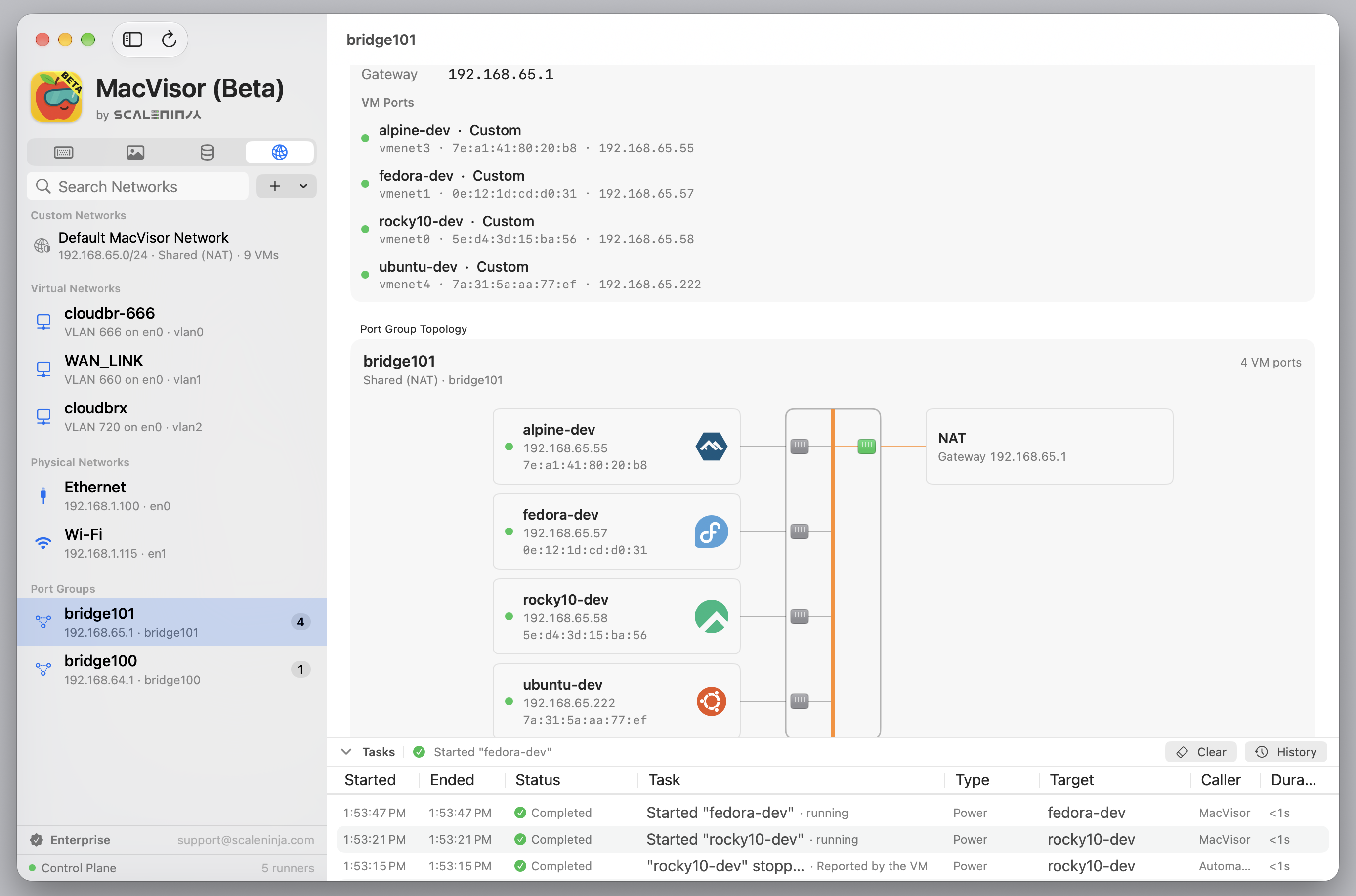
An always-on host
Set VMs to start when you log in and run them headless. Choose whether running VMs shut down or suspend when the Mac logs out or restarts. Watch everything from the menu bar or the dashboard, which shows host resources, tasks and the health of the background service. Turn on power-failure restart and automatic login, and a Mac mini comes back on its own after a power cut and starts its VMs. The always-on host guide covers those settings, including the FileVault trade-off.
Tech Preview: Windows 11 on ARM
Point MacVisor at Microsoft's Windows 11 on ARM ISO and it installs Windows unattended in about 10 minutes. Windows 11 on ARM VMs are tested to work on macOS 27.2 (beta). Your account, Remote Desktop and the guest agent are set up for you. The VM's own window is limited to 1024 x 768, so mvz rdp opens it in Microsoft's Windows App for a sharp display. There is no TPM and no GPU acceleration, so it suits testing software and running Windows tools, not games or 3D work.
Tech Preview: AI sandboxes
mvz sandbox create ~/src/app --name app --agent claude
mvz sandbox run app -- "fix the failing test in parser.swift"
mvz sandbox diff app
mvz sandbox apply app --branch
A sandbox is a disposable Linux or macOS 27 VM with a copy of your project and a coding agent installed: Claude Code, Codex, Goose, Aider or OpenCode. The agent runs with its permissions off, because the VM is the boundary. Models come from your Mac (Ollama, LM Studio, oMLX, llama.cpp) or from Claude and GPT through a gateway on the Mac. API keys stay in your Keychain and never enter the VM. Internet access is limited to the hosts you allow.
When the agent is done, review the diff on your Mac, then apply it to your project or put it on a branch. Checkpoints let you roll the sandbox back. An MCP server (mvz mcp serve) lets agents running on your Mac use sandboxes too.
What MacVisor is not
- It does not emulate x86. Guests are ARM64. x86 images will not boot, though Linux guests can run x86-64 binaries through Rosetta.
- It needs macOS 27 on an Apple Silicon Mac. Nested virtualization needs an M3 or later.
- Snapshots are not a backup. They live with the VM on the same disk. Back up the Mac and its VM storage to another device.
About the beta
MacVisor 27 ships today as a public beta, and a beta has rough edges. Expect bugs, some of the app's wording and layout will change, and a feature may behave differently from one build to the next. Windows 11 guests and AI sandboxes are Tech Previews on top of that: they work, but their commands and defaults may still change.
A few habits make the beta painless:
- Shut your VMs down before you update MacVisor. Suspended VMs and live snapshots are only meant to restore on the build that made them.
- Keep anything you can't lose backed up outside the VM.
If something breaks, behaves oddly, or simply annoys you, email support@scaleninja.com.
Try MacVisor
MacVisor requires macOS 27 on an Apple Silicon Mac.